Edge
®
820
13
EN
surrounding area before charging or connecting to a computer.
The device is powered by a built-in lithium-ion battery that you can charge
using a standard wall outlet or a USB port on your computer.
NOTE: The device will not charge when outside the approved temperature
range
(Edge Specifications, page 92)
.
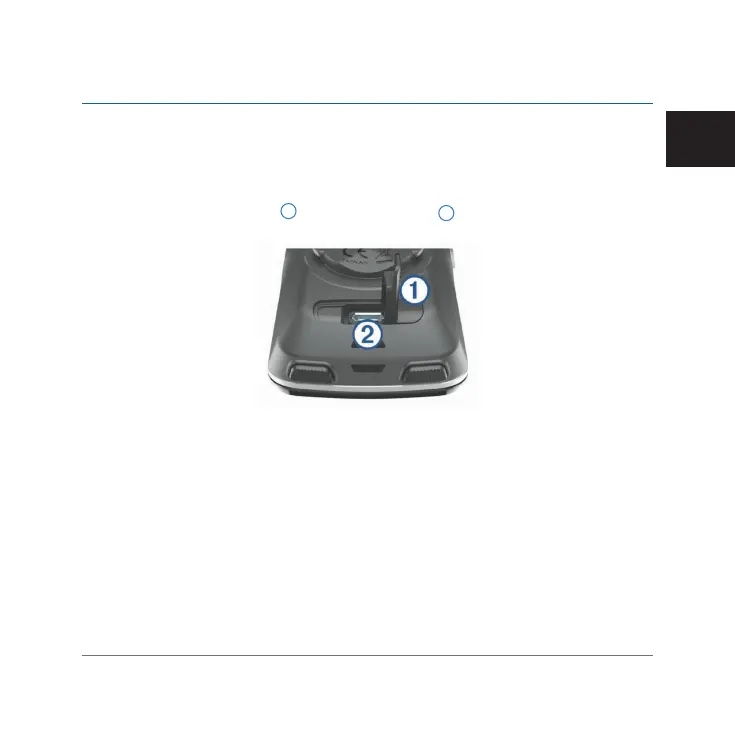
1 Pull up the weather cap
1
from the USB port
2
.
2 Plug the small end of the USB cable into the USB port on the device.
3 Plug the large end of the USB cable into an AC adapter or a computer USB
port.
4 Plug the AC adapter into a standard wall outlet. When you connect the
device to a power source, the device turns on.
5 Charge the device completely.
Installing the Standard Mount
For the best GPS reception, position the bike mount so the front of the device
Edge 820_SEA英泰印 [4.75x4.75]-7.indd 13 2016/8/27 下午 03:01:29


 To Next Page
 Loading...











