56
Edge
®
820
EN
ANT+ Sensors
Your device can be used with wireless ANT+ sensors. For more information
about compatibility and purchasing optional sensors, go to http://buy.garmin.
com.
Putting On the Heart Rate Monitor
You should wear the heart rate monitor directly on your skin, just below your
sternum. It should be snug enough to stay in place during your activity.
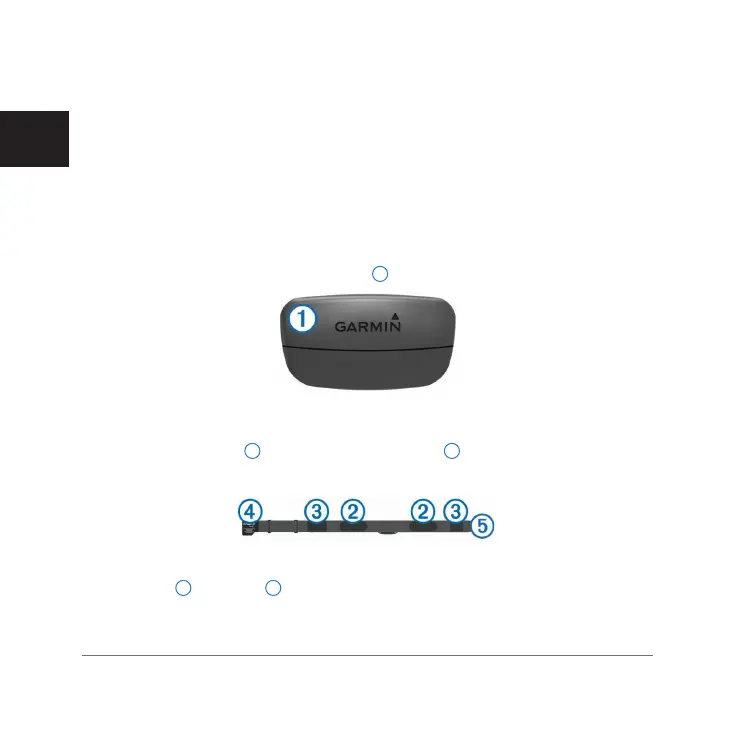
1 Snap the heart rate monitor module
1
onto the strap.
The Garmin
®
logos (on the module and the strap) should be right-side up.
2 Wet the electrodes
2
and the contact patches
3
on the back of the strap
to create a strong connection between your chest and the transmitter.
3 Wear the heart rate monitor with the Garmin logos facing right-side up.
The hook
4
and loop
5
connection should be on your right side.
4 Wrap the strap around your chest, and connect the strap hook to the loop.
Edge 820_SEA英泰印 [4.75x4.75]-7.indd 56 2016/8/27 下午 03:01:33



 To Next Page
 Loading...










