Edge
®
820
75
EN
Sending Your Ride to Garmin Connect
NOTICE
To prevent corrosion, thoroughly dry the USB port, the weather cap, and the
surrounding area before charging or connecting to a computer.
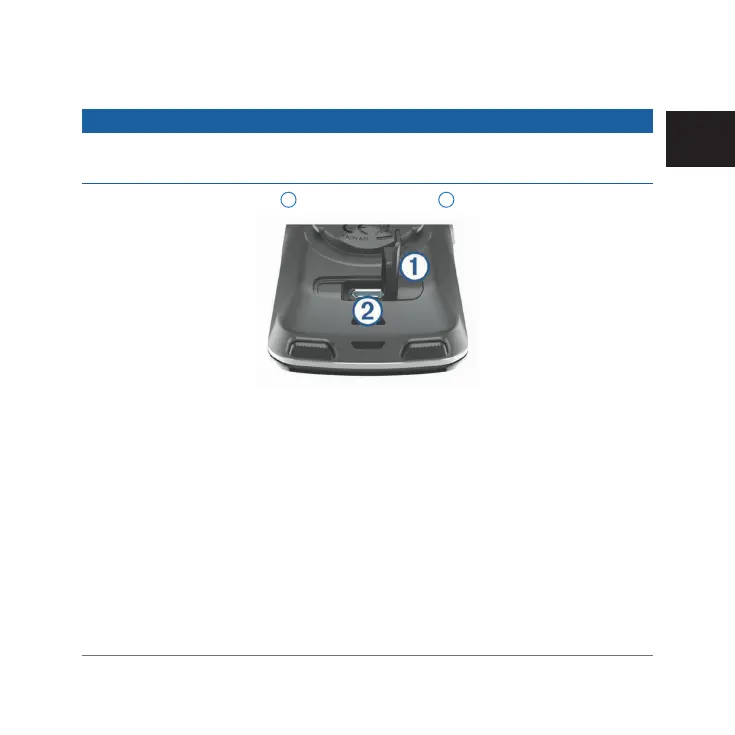
1 Pull up the weather cap
1
from the USB port
2
.
2 Plug the small end of the USB cable into the USB port on the device.
3 Plug the large end of the USB cable into a computer USB port.
4 Go to www.garminconnect.com/start.
5 Follow the on-screen instructions.
Garmin Connect
You can connect with your friends on Garmin Connect. Garmin Connect gives
you the tools to track, analyze, share, and encourage each other. Record the
events of your active lifestyle including runs, walks, rides, swims, hikes, tri-
athlons, and more. To sign up for a free account, go to www.garminconnect.
com/start.
Edge 820_SEA英泰印 [4.75x4.75]-7.indd 75 2016/8/27 下午 03:01:34



 To Next Page