64
Edge
®
820
EN
The sensor may be tilted when installed on an asymmetrical hub. This does
not affect operation.
3 Rotate the wheel to check for clearance.
The sensor should not contact other parts of your bike.
NOTE: The LED flashes green for five seconds to indicate activity after two
revolutions.
Installing the Cadence Sensor
NOTE: If you do not have this sensor, you can skip this task.
TIP: Garmin recommends you secure your bike on a stand while installing the
sensor.
1 Select the band size that fits your crank arm securely.
The band you select should be the smallest one that stretches across the
crank arm.
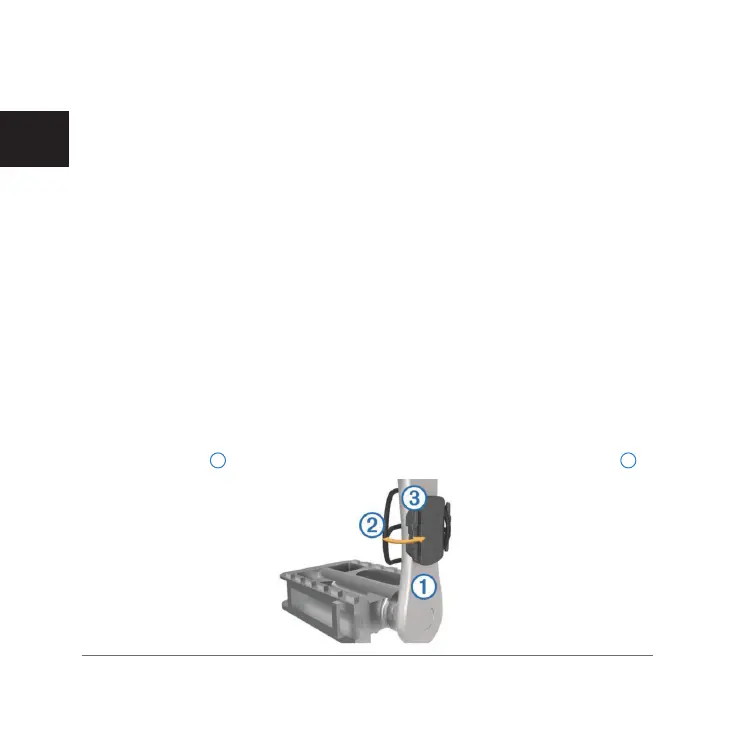
2 On the non-drive side, place and hold the flat side of the cadence sensor
on the inside of the crank arm.
3 Pull the bands
1
around the crank arm, and attach them to the hooks
2
on the sensor.
Edge 820_SEA英泰印 [4.75x4.75]-7.indd 64 2016/8/27 下午 03:01:33



 To Next Page