Edge
®
820
63
EN
• Warm up for 5–10 minutes.
• Follow the care instructions
(Caring for the Heart Rate Monitor, page 94)
.
• Wear a cotton shirt or thoroughly wet both sides of the strap.
Synthetic fabrics that rub or flap against the heart rate monitor can create
static electricity that interferes with heart rate signals.
• Move away from sources that can interfere with your heartrate monitor.
Sources of interference may include strong electromagnetic fields, some
2.4 GHz wireless sensors, high-voltage powerlines, electric motors, ovens,
microwave ovens, 2.4 GHz cordless phones, and wireless LAN access points.
Installing the Speed Sensor
NOTE: If you do not have this sensor, you can skip this task.
TIP: Garmin recommends you secure your bike on a stand while installing the
sensor.
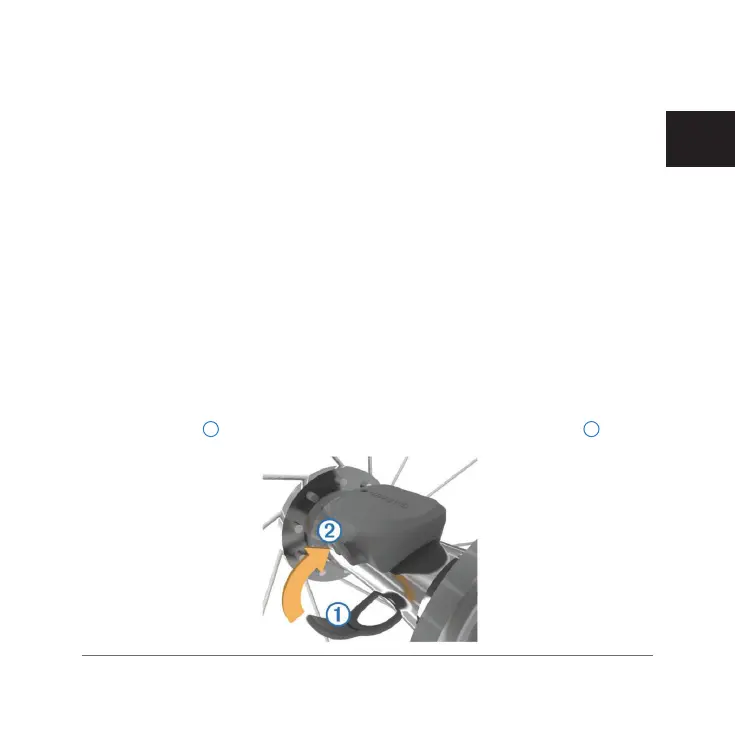
1 Place and hold the speed sensor on top of the wheel hub.
2 Pull the strap
1
around the wheel hub, and attach it to the hook
2
on the
sensor.
Edge 820_SEA英泰印 [4.75x4.75]-7.indd 63 2016/8/27 下午 03:01:33


 To Next Page