96
Edge
®
820
EN
3 Wait 30 seconds.
4 Insert the new battery with the positive side facing up.
NOTE: Do not damage or lose the O-ring gasket.
5 Replace the back cover and the four screws.
NOTE: Do not overtighten.
After you replace the heart rate monitor battery, you may need to pair it with
the device again.
Replacing the Speed Sensor or Cadence Sensor Battery
The LED flashes red to indicate a low battery level after two revolutions.
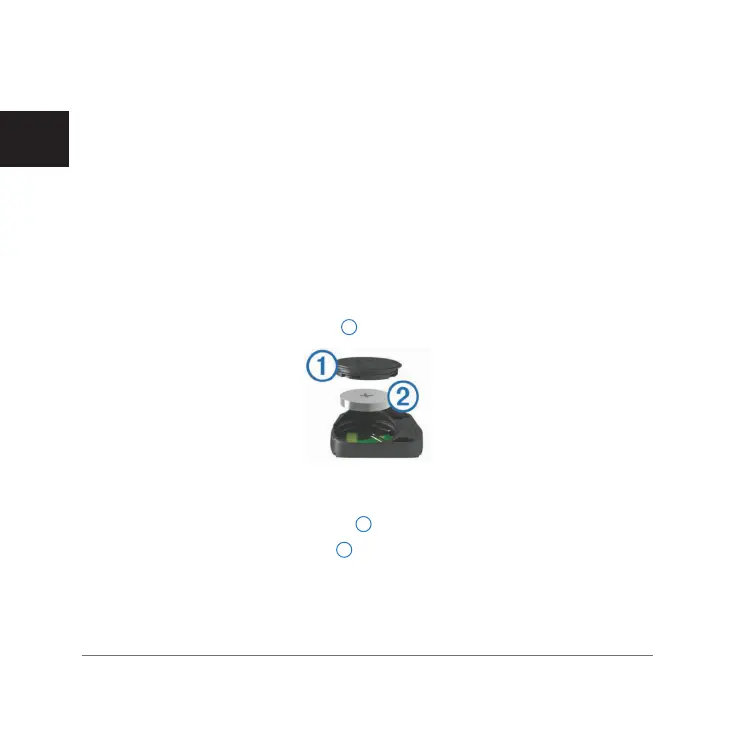
1 Locate the circular battery cover
1
on the back of the sensor.
2 Twist the cover counter-clockwise until the marker points to unlocked and
the cover is loose enough to remove.
3 Remove the cover and the battery
2
.
TIP: You can use a piece of tape
3
or a magnet to remove the battery from
the cover.
Edge 820_SEA英泰印 [4.75x4.75]-7.indd 96 2016/8/27 下午 03:01:35


 To Next Page