Enabling Shadow Drive
™
NOTE: The Shadow Drive feature is not available on all autopilot models.
From the autopilot screen, select Options > Autopilot Setup > Shadow Drive > Enabled.
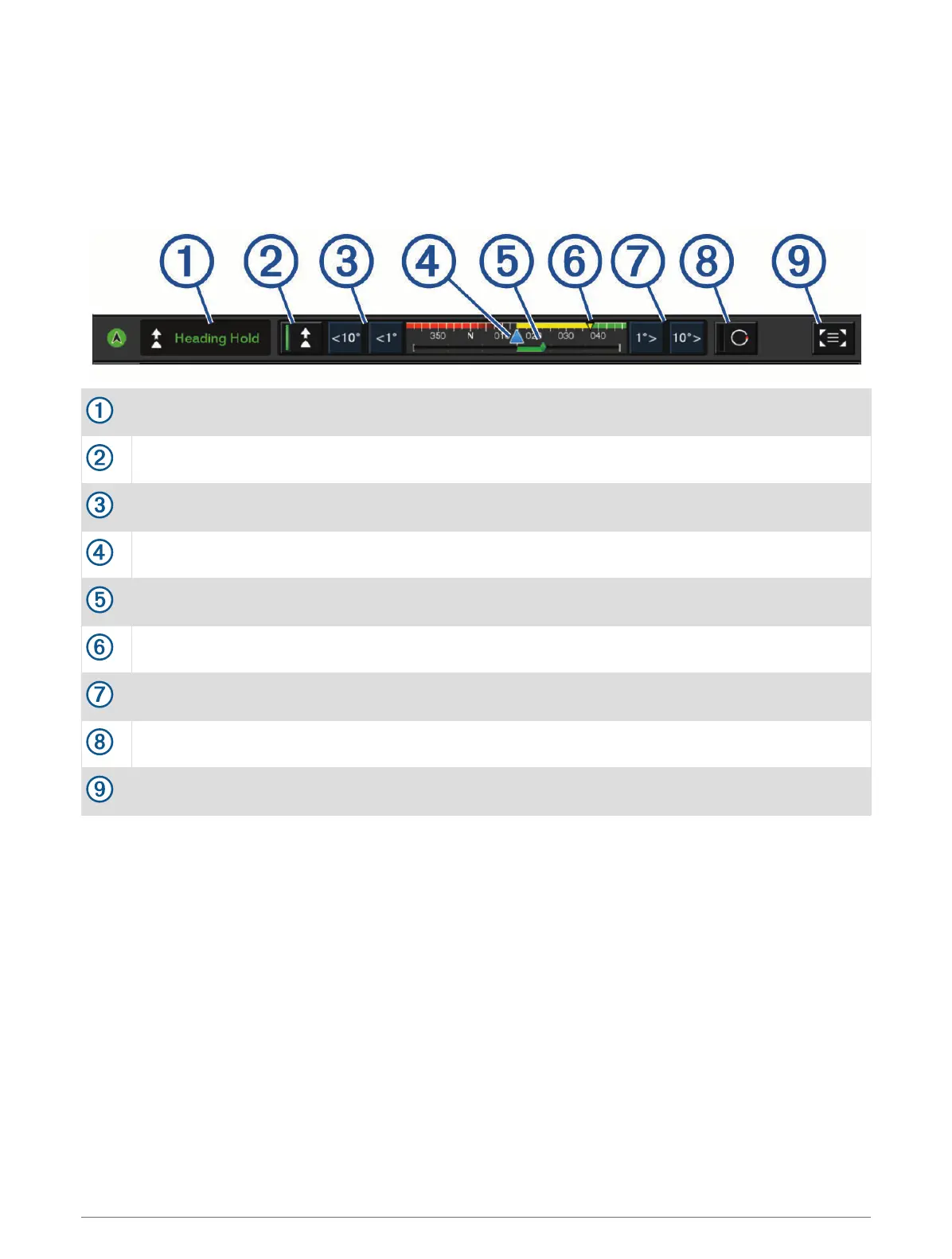
Autopilot Overlay Bar
NOTE: Not all options are available on all autopilot models.
Autopilot mode
Enables the heading hold
Steers left
Actual heading
Rudder position indicator (available only when a rudder sensor is connected)
Intended heading (heading the autopilot is steering toward)
Steers right
Engages the steering pattern
Opens the full autopilot screen and menu
Engaging the Autopilot
When you engage the autopilot, the autopilot takes control of the helm and steers the boat to maintain your
heading.
From any screen, select Engage.
Your intended heading shows in the center of the Autopilot screen.
Adjusting the Heading with the Helm
NOTE: You must enable the Shadow Drive feature before you can adjust the heading using the helm (Enabling
Shadow Drive
™
, page 107).
With the autopilot engaged, manually steer the boat.
The autopilot activates Shadow Drive mode.
When you release the helm and manually maintain a specific heading for a few seconds, the autopilot
resumes a heading hold at the new heading.
Autopilot 107



 To Next Page