Customizing the Chartplotter
Home Screen
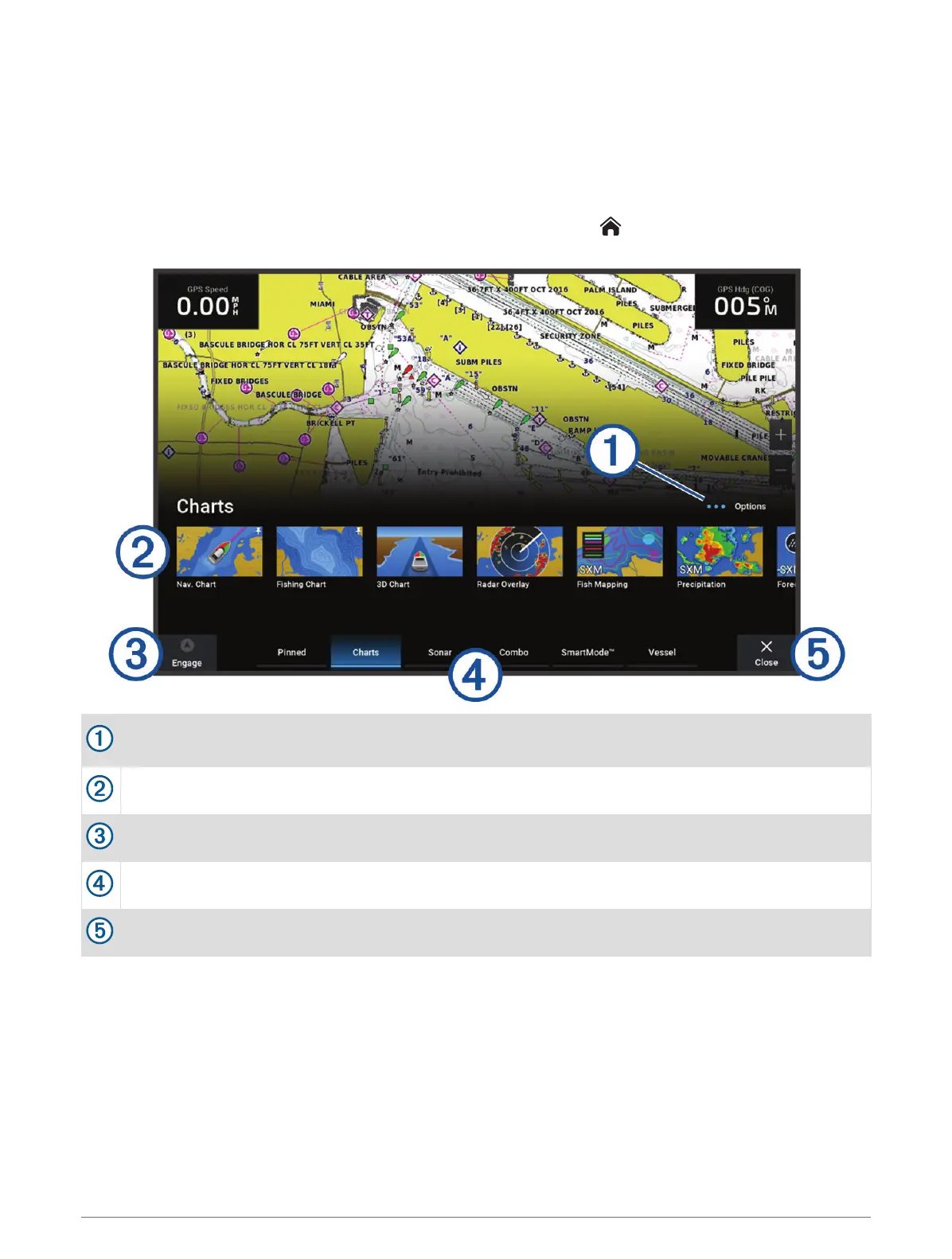
The home screen is an overlay that provides access to all of the features in the chartplotter. The features are
dependent on the accessories you have connected to the chartplotter. You may not have all of the options and
features discussed in this manual.
When viewing any screen, you can return to the home screen by selecting .
Options button, which allows you to rearrange the category and add features to the Pinned category.
Also provides access to Settings system settings.
Features buttons
Present time, present depth, or autopilot control button
Category tabs
Closes the home screen and returns to the previously open page
The categories tabs provide quick access to the main features of your chartplotter. For example, the Sonar tab
displays the views and screens related to the sonar feature. You can save items you commonly access to the
Pinned category.
TIP: To view the available categories tabs, you may need to click and drag a tab to scroll left or right.
The SmartMode items are geared toward an activity, such as cruising or docking. When a SmartMode button is
selected from the home screen, each display in the station can show unique information. For example, when
Cruising is selected from the home screen, one display can show the navigation chart and another display can
show the radar screen.
When multiple displays are installed on the Garmin Marine Network, you can group them together into a station.
A station enables the displays to work together, instead of as several separate displays. You can customize the
12 Customizing the Chartplotter



 To Next Page