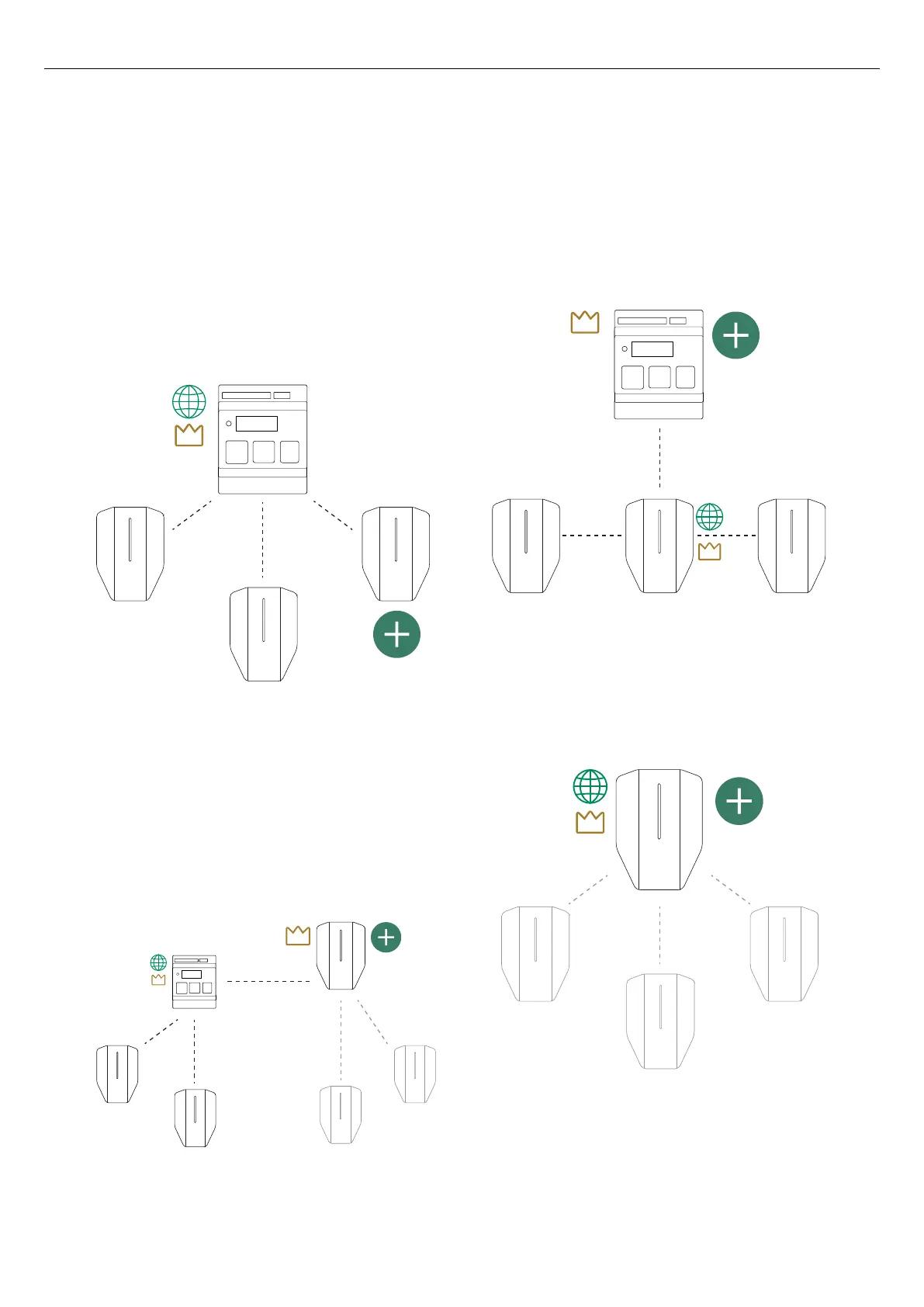
New units that are a part of a DLM system must be
added (connected) to groups. There are 4 main ways to
do this:
• Add the unit to an existing group.
This the most common setup. It is used to add a new
unit to an existing group.
One example of this is adding a load interface, to
take over the DLM master role of a group. The
picture below shows adding a charging station.
• Create a new subgroup.
This method is used to add DLM control to a new
subgroup of charging stations either with a
charging station acting as DLM master or a load
interface acting as master. The subgroup receives
its power from the first group. This means that the
first group’s fuse is used on a higher level for both
the first group and the new subgroup.
• Create a new superior group.
This method is only used for adding a load interface
acting as DLM master 1 level up. Use this when a
existing group requires a dynamic DLM, that is a
DLM master that monitors/measures current in a
feeding fuse. Applicable when the critical fuse to
protect also feeds both charging stations and other
non-controlled loads.
• Create a new stand-alone group.
This method is used to directly connect a unit to a
new unique group. The unit is not directly connected
to any other group. It is mainly used to form
another, separate DLM system at same location.
Version: 1.3 25
Installation



 To Next Page