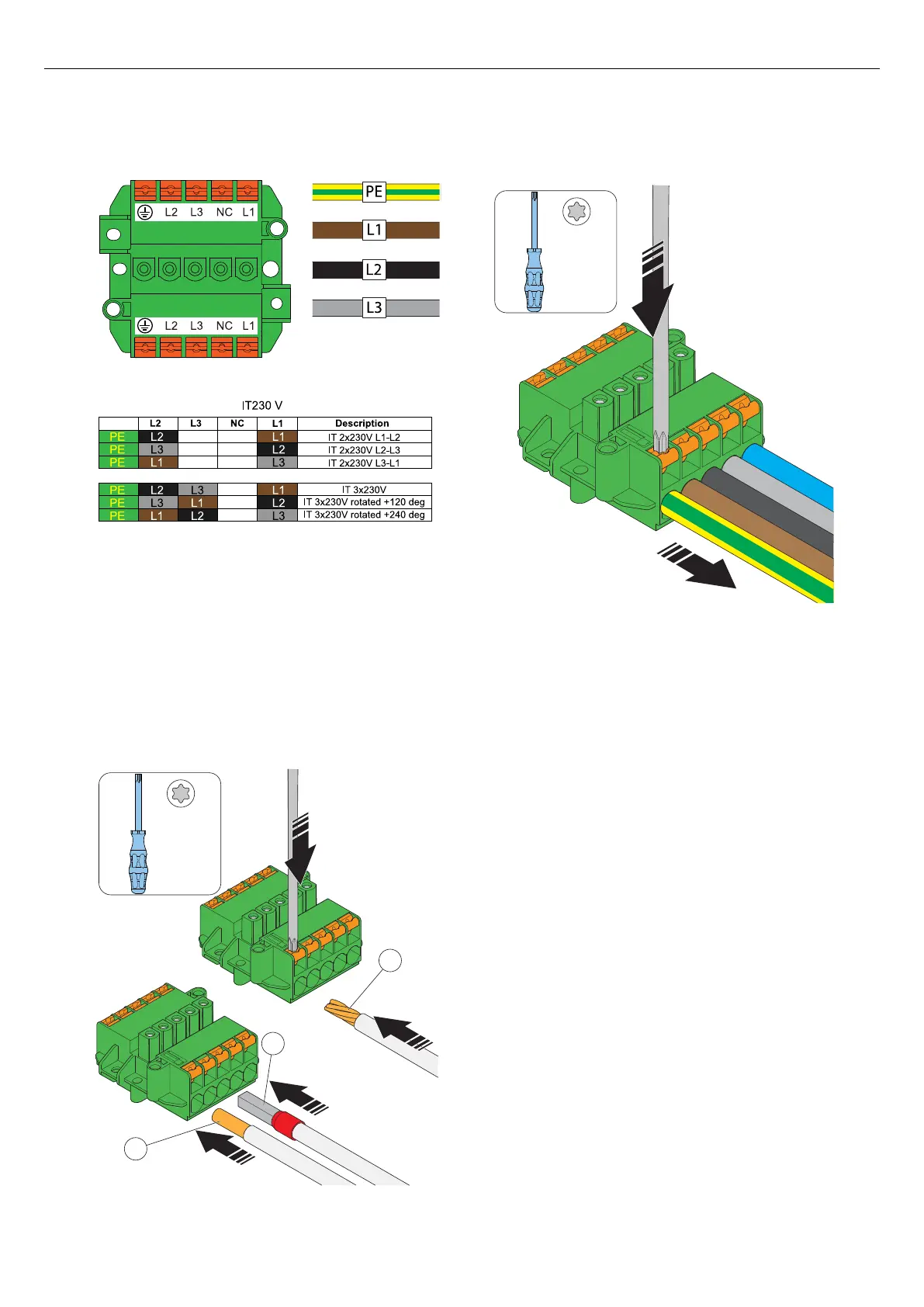
c. IT system.
2. Install the wires to the terminal block.
a. If the wires have strained conductors (A), use a
TX20 screwdriver and push the orange button to
open the terminal.
b. If the wires have cable ferrules (B) or solid
conductors (C), push the wires into the terminal.
3. To remove any wire, push a TX20 screwdriver on
the terminal and pull the wire out.
4.12.6 TO INSTALL A SECOND POWER CABLE
(DAISY-CHAINING METHOD)
If several charging stations are fed by the same power
cable in a daisy chain, a second power cable can also
be connected to the terminal.
1. Dismantle the second power cable for installation.
Refer to 4.12.4 To prepare the power cable for
installation, page 29.
2. Install the wires of the second power cable to the
terminal. For more information about installation
types, refer to 4.12.5 To connect the power cable
to the terminal, page 31.
4.12.7 TO PREPARE THE INSTALLATION BRACKET
WITH AN ETHERNET CABLE
If ethernet should be used, the installation bracket must
be prepared with the ethernet cable.
1. Thread the ethernet cable through the installation
bracket.
PE
18 mm
18 mm
A
B
C
TX20
18 mm
TX20
Version: 1.3 33
Installation



 To Next Page