13. Disconnect the test equipment.
14. Test charging an EV.
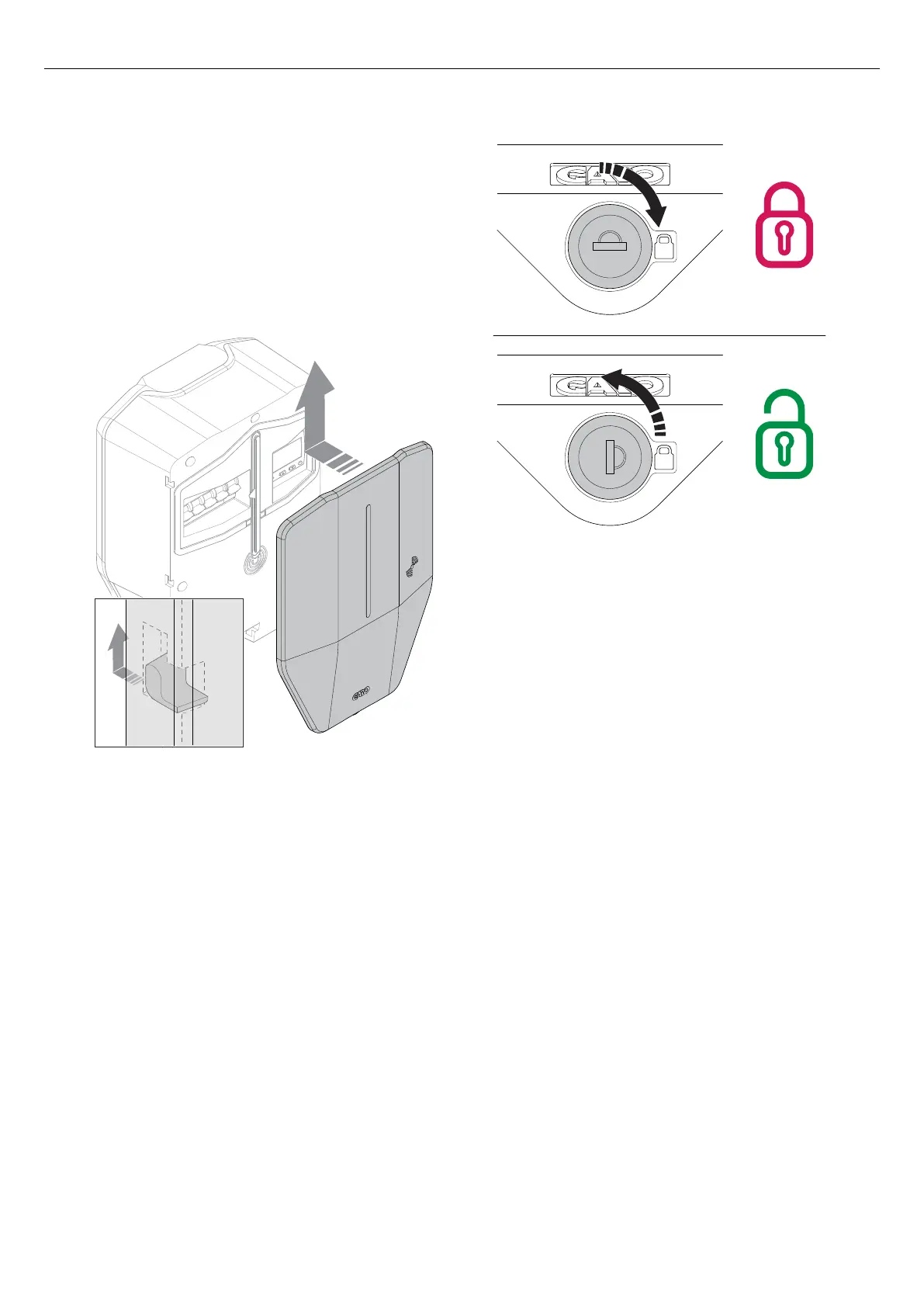
4.12.16 TO MOUNT THE FRONT COVER OF THE
CHARGING UNIT
1. Mount the front cover of the charging unit.
2. Lock the front cover at the bottom of the charging
unit. The key can only be removed in locked
position.
NOTE
The front cover is supplied with two keys. Both keys
should be handed over to the owner of the charging
station.
3. After the final testing, the installation of the
charging station can be declared ready in the
GARO Connect app, The charging station becomes
available to use and visible to EV drivers with
access rights.
NOTE
If the charging station is part of a connection group for
DLM, then it is recommended to complete the whole
installation of the connection group and to test it, before
the installation is handed over to owner for operation.
4.13 DYNAMIC LOAD MANAGEMENT (DLM)
4.13.1 DYNAMIC LOAD MANAGEMENT (DLM)
FUNCTIONALITY
Dynamic Load Management (DLM) is based on a
grouping of loads that share a specific critical
equipment, such as a fuse. Each connection group is
based on one master device (charging station or load
interface) in the connection group. The master device
Version: 1.3 43
Installation



 To Next Page