NOTE
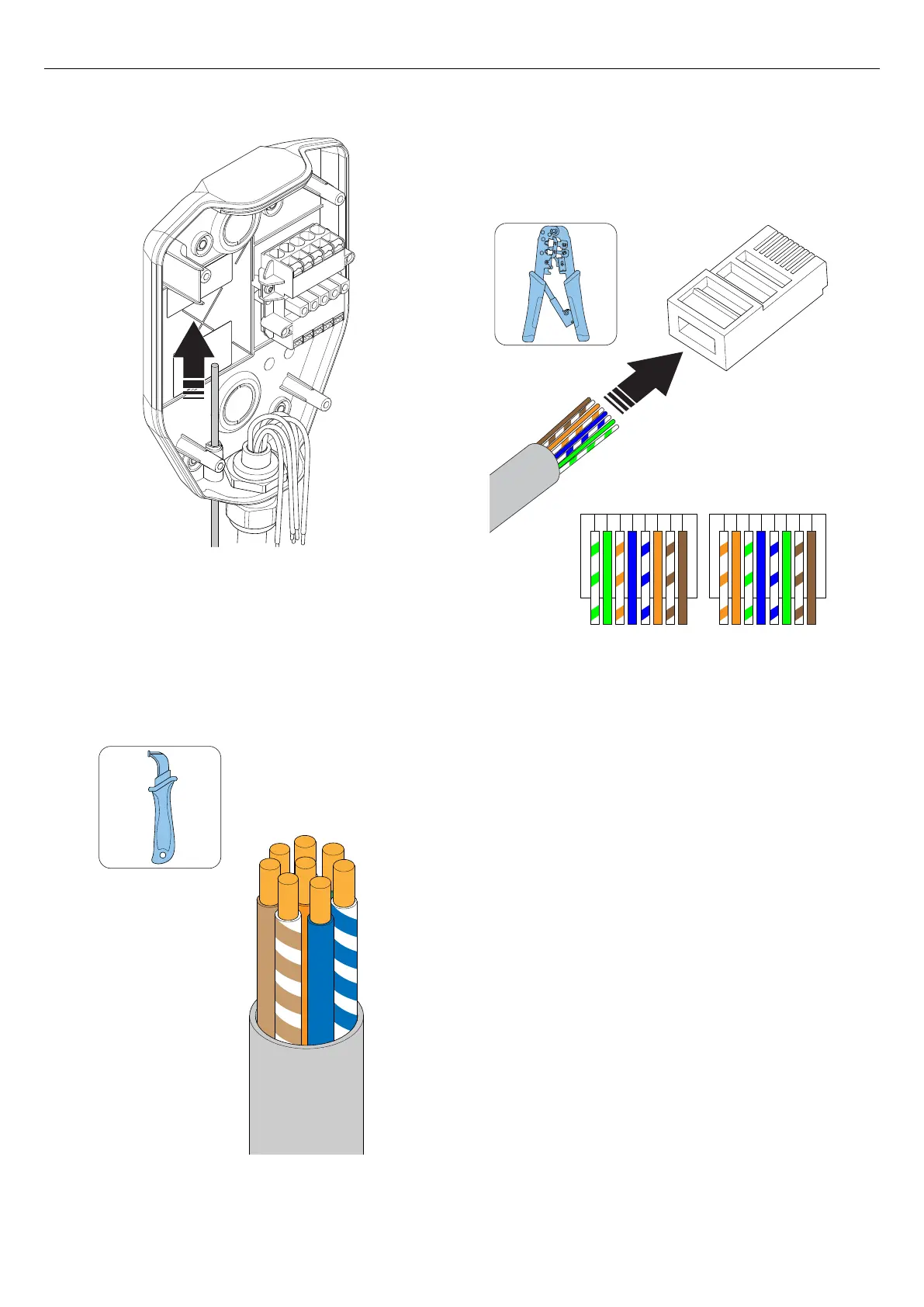
The recommended length for the ethernet cable inside
the installation bracket is 400 mm.
2. Secure the ethernet cable(s) from pull-out forces, for
example with a cable strap.
3. Dismantle the ethernet cable.
4. Put a piece of tape on the cable to increase the
cable diameter and to tighten/seal the hole.
5. Install the ethernet cable to a RJ45 plug.
NOTE
Both shielded or unshielded ethernet cables are possible
to use, depending on installation conditions.
4.12.8 TO PREPARE THE INSTALLATION BRACKET
WITH A SECOND ETHERNET CABLE
If ethernet should be used as internet connection for
several units (i.e. either charging stations or a load
interface), the installation bracket must be prepared
with a second ethernet cable. Refer to 4.12.7 To
prepare the installation bracket with an ethernet cable,
page 33.
• Install a second ethernet cable through the outlet
hole in the installation bracket. Refer to 4.12.7 To
prepare the installation bracket with an ethernet
cable, page 33.
12345678 12345678
T568AT568B
34 Version: 1.3
Installation



 To Next Page