14
Diagnostics
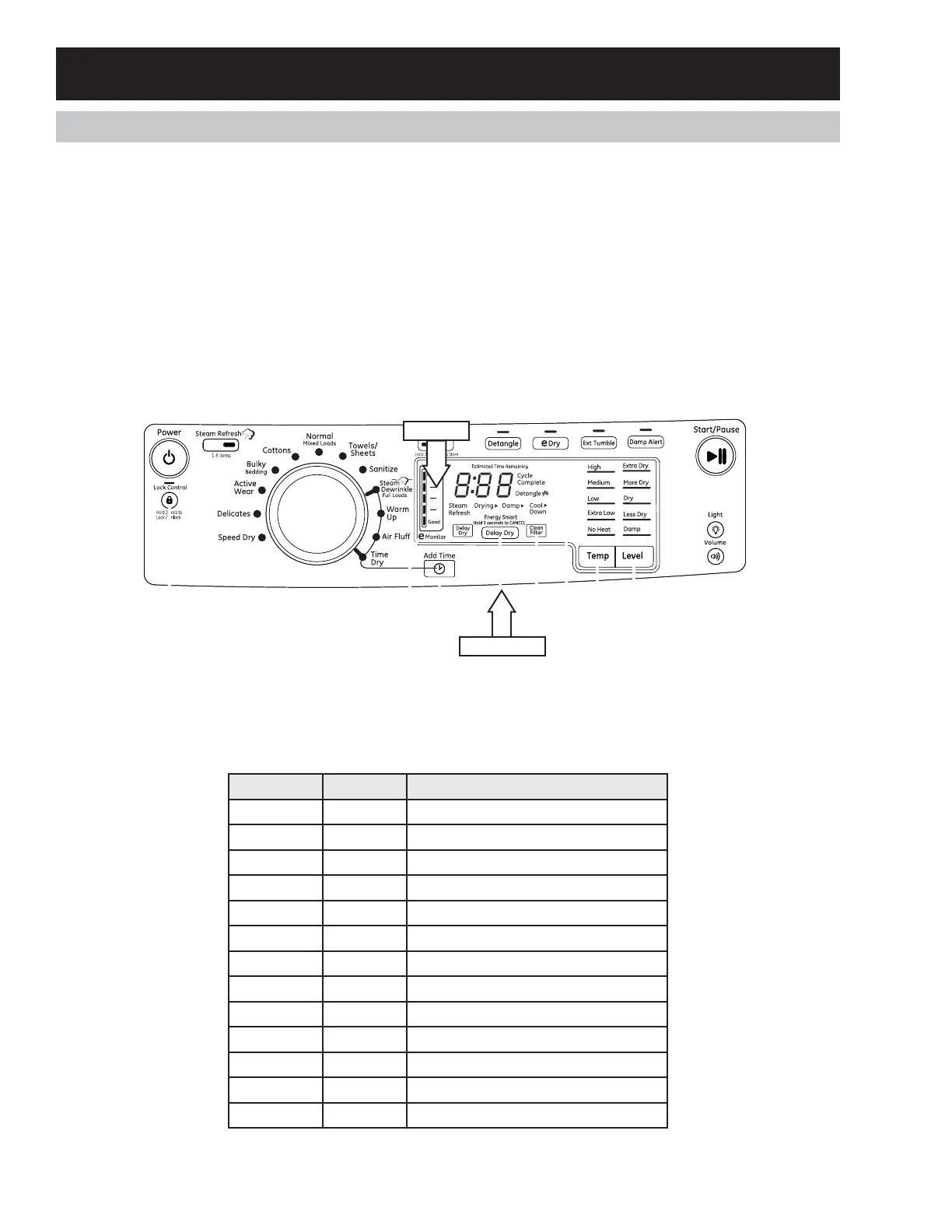
Se r v i c e M o d e En t r y
Th e co nt r o l m u st b e i n t h e i d le st a t e t o en t er Ser v ic e Mod e.
Pr ess a n d r el ea se My Cycle, then press and release Delay Dry, t hen press and release My Cycle, t hen press
and release Delay Dry. T1 will be displayed if keys were properly pressed.
• Rotate the cycle select knob CW to increase the test number.
• Rotate the cycle select knob CCW to decrease the test number.
• Press the Start key to enter a test.
• Turn the cycle select knob to exit the test.
Service Mode Exit
Pr ess t h e Po w er key or disconnect power from unit . Service Mode will automatically time out after 5 minutes
if there is no user activity.
Service Mode Tests
Test # SSD Test Fu nct i on
1t1 Model Codes
2t2 UI Software Version
3t3 XML Version
4t4 Error Codes
5t5CRC Non-Volatile Memory
6t6 User Interface
7t7 Outlet Thermistor
8t8 Inlet Thermistor
9t9 Moisture Sensor
10 t10 Door Open/Closed
11 t11 Water Valve
12 t12 Restore EEPROM
13 t13 Drum
Service Mode
My Cycle
Delay Dry



 To Next Page