20
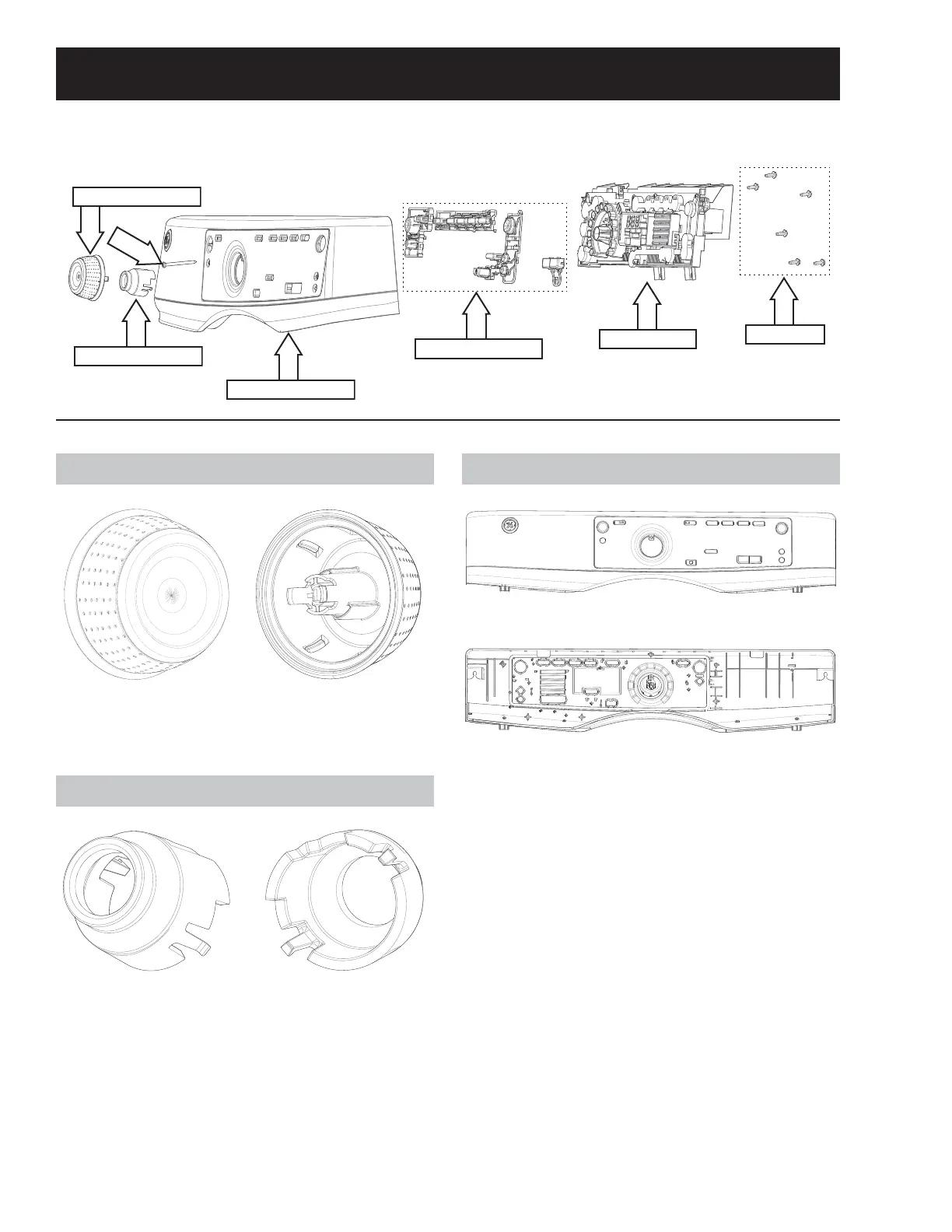
Cy cl e Sel ect Kn ob
Fron t View Rear View
*UDVSWKHNQRE¿UPO\DQGSXOOIRUZDUGWRUHPRYH
Knob Retainer
Front View Rear View
Knob Ret ai ner Removal
*UDVSWKHNQREUHWDLQHU¿UPO\DQGSXOOIRUZDUGWR
remove.
Con t r o l Pa n el
Fron t View
Re a r Vi e w
Th e co nt r o l p an el i s a p la st i c h ou sin g w i t h g r ap hi cs.
Th e b ut t o n t r ees, kn ob , kn o b r et a in er a n d UI b oa r d
must be obtained separately.
Con t r o l Pa n el Rem ov al
1. Remove the cycle select knob by pulling it for-
ward.
2. Remove the knob retainer by pulling it forward.
3. Remove the T-20 control panel screw located
behind the knob retainer.
4. Lift the control panel straight up and tilt it for-
ward.
5. Remove all main board wire harness connec-
tions and remove the control panel.
Control Panel Components
Control Panel Exploded View
Cyc l e Se lec t Kn ob
Knob Retainer
Button Trees
Control Board
5/16" hex
Control Panel
T-20



 To Next Page