assembly and installation
Electrical Installation
7160-9001-560
01. December 2020
22 / 74
5.7.1 Connect control unit (VP8002 - DairyPlan-PC)
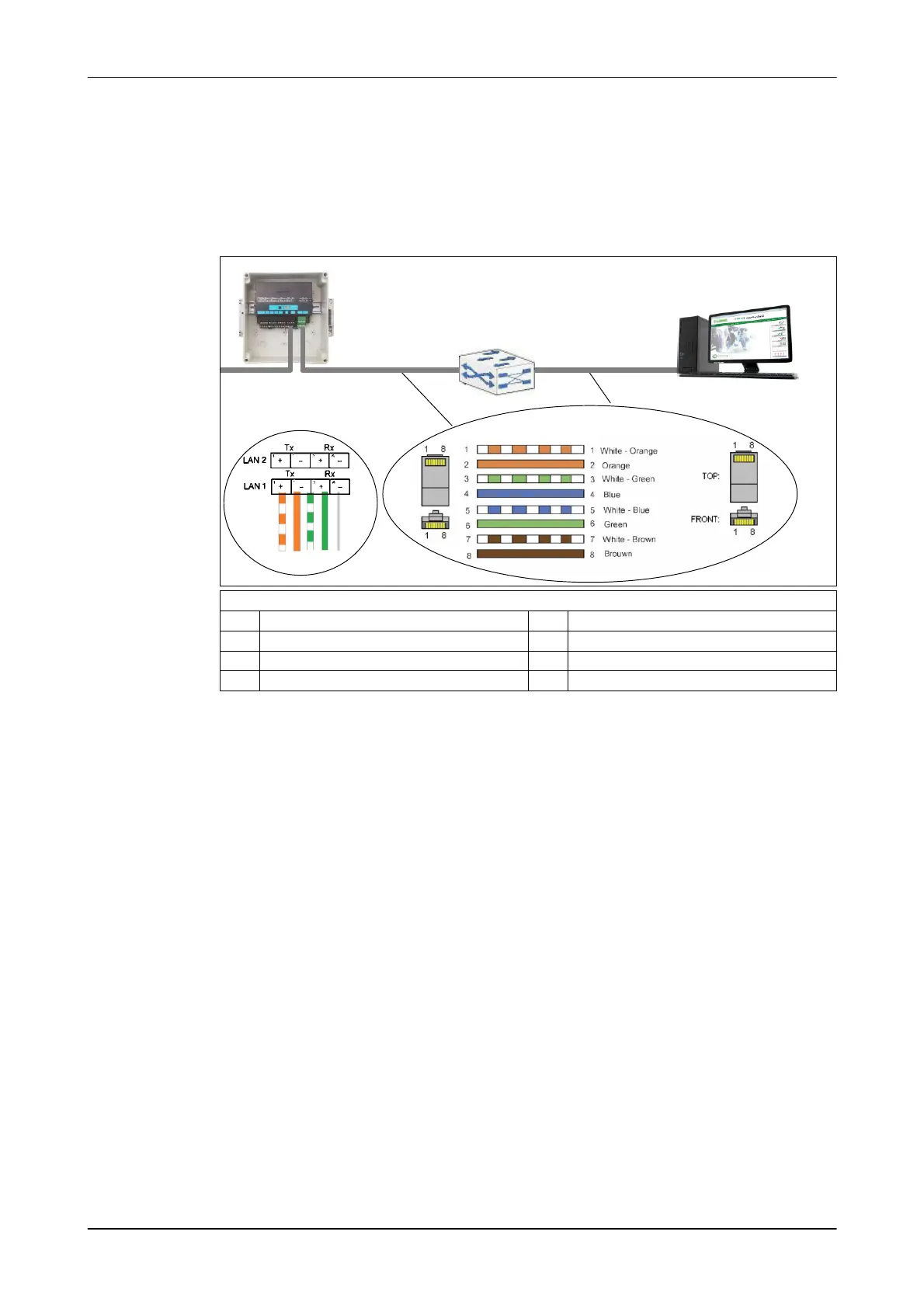
Connection drawings
The control unit can be connected to a network distributor (ethernet switch) or
directly to the herd management PC.
Connection to an ethernet switch
LAN2
VP8002
LAN1
Straight Cable (TIA/EIA-568B)
max 100 m max 100 m
DP-PC
1236
Cable assignment: Straight Cable (TIA/EIA-568B)
1 White/orange 5 White/blue
2 Orange 6 Green
3 White/green 7 White/brown
4 blue 8 brown
Preparing the Ethernet cable
Prepare the cable according to the connection variant between the control unit and
the herd management PC.
Cat5 network cables with RJ45 connectors must be used.
● (Cat5 network cable 0005-3999-078).
● RJ45 connector
Observe the permitted cross-sections!
- Outside diameter of the data cable: 4,5 - 8 mm
- Maximum diameter of individual cores: 1,6 mm
Pin assignment fully in accordance with standard TIA 568-B!













 To Next Page