Troubleshooting
Replacing the control unit
7160-9001-560
01. December 2020
68 / 74
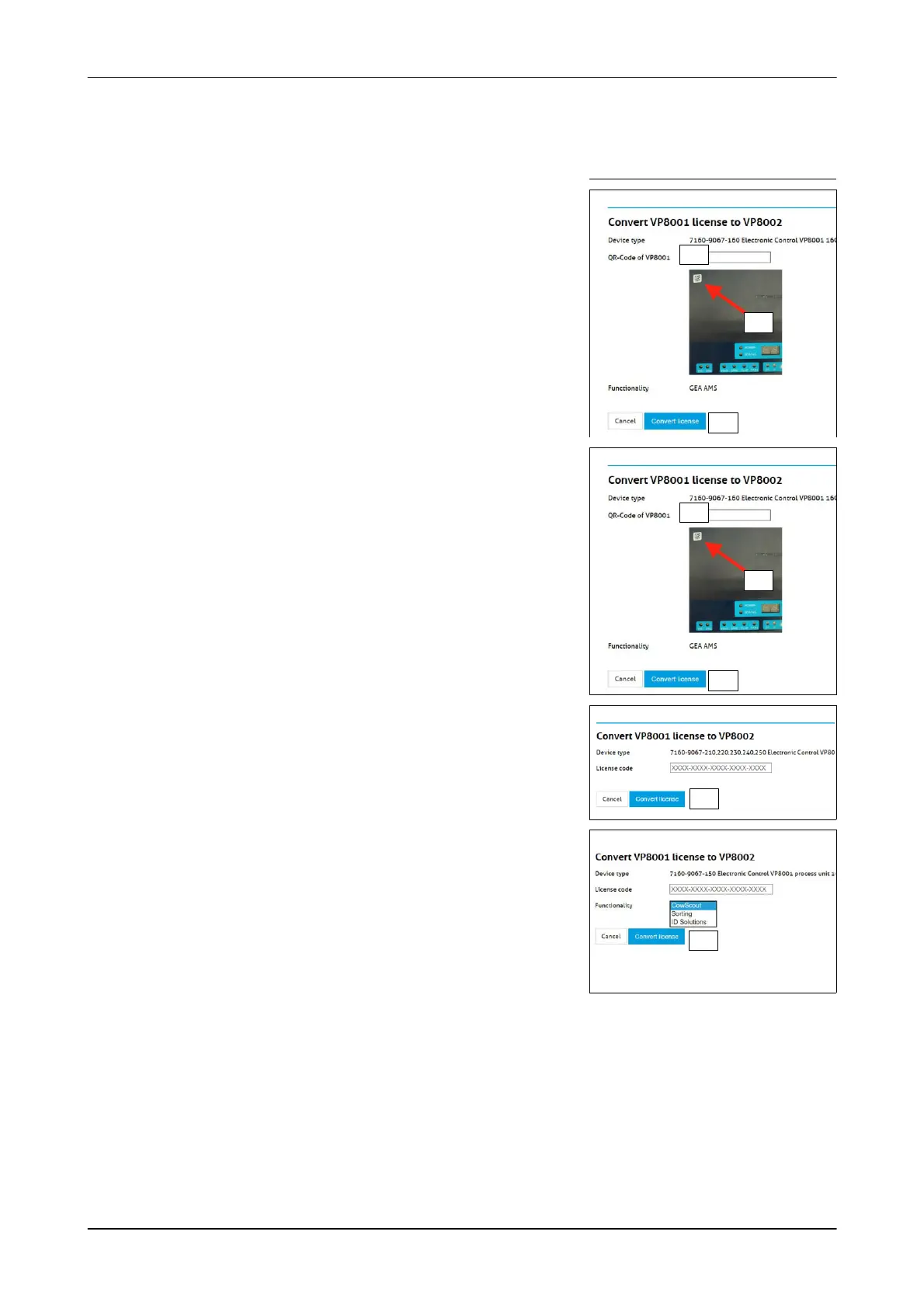
- The display shown appears
The display and instructions depend on the selected control unit.
Start conversion
Steps, only apply to the control unit:
7160-9067-160:
- The display shown appears
1. QR code read with smartphone app
(the code is on the decal)
- e.g. "QR Reader" for iOS devices
- e.g. "QR Code reader" for Android
devices
1.
2.
3.
Display: 7160-9067-160
2. Enter the QR code
Example: A0040700742
3. Click the button (Convert license)
- Licence is converted
- Continue from step 4.
1.
2.
3.
Display: 7160-9067-160
Steps, only apply to control units:
7160-9067-150, 7160-9067-210...250:
1. Enter the licence code
(code: see decal or "Voucher" enclosed
with the control unit)
Display: 7160-9067-210...250:
3.
2. Only applies to the control unit:
7160-9067-150
Select the function of the VP8001 control
unit
- CowScout - Sorting - ID Solutions
3. Click the button (Convert license)
- Licence is converted
Display: 7160-9067-150
3.













 To Next Page