97
Adjusting the TextGroup
When a TextGroup is created, it is positioned in the top-left corner of the image.
There are two methods for repositioning the text.
The fi rst method is to use local x-y coordinates. The second method is to use
mouse to interactively position the text on the image.
All images are comprised of pixels. Each pixel on the screen is repre-
sented by a pair of numbers called a coordinate pair, represented as (x,
y). When specifying coordinates the x-coordinate (horizontal position) is
specifi ed fi rst, followed by the y-coordinate (vertical position).
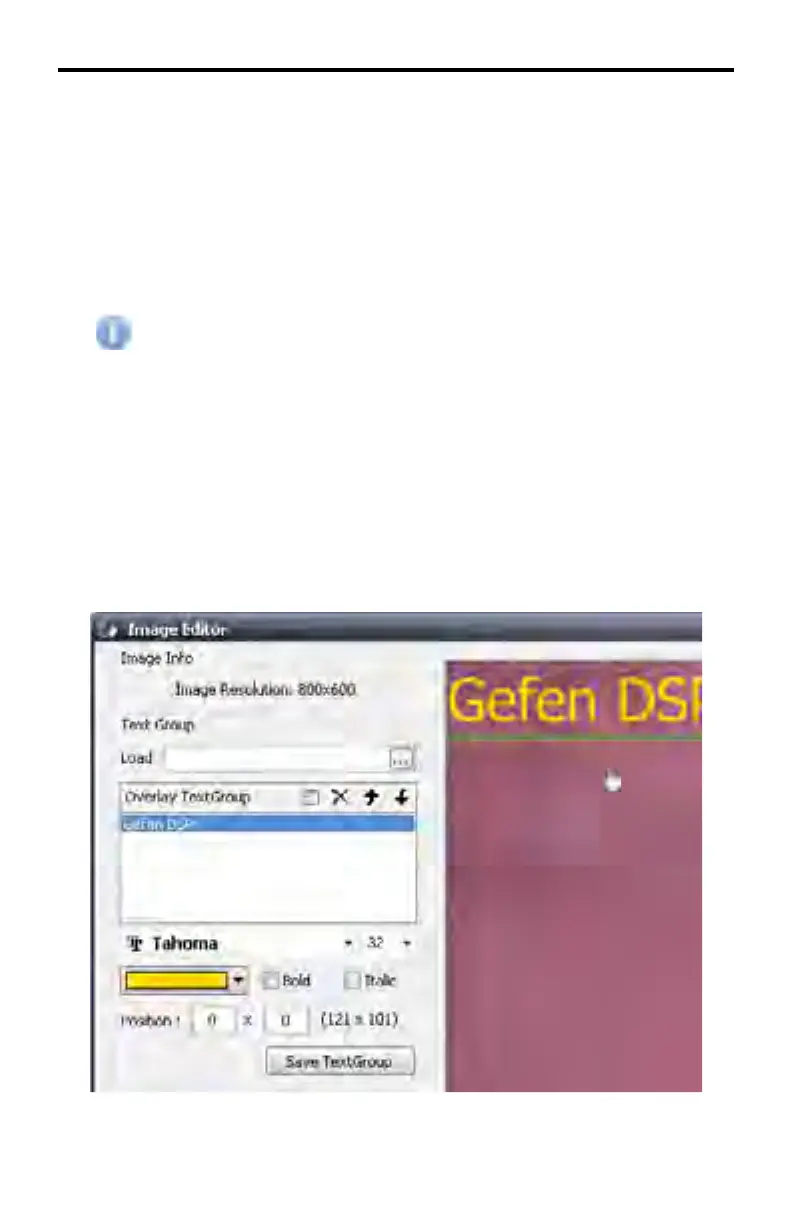
Under the Bold and Italic check boxes are two boxes which represent the current
position of the TextGroup. The value in the fi rst box represents the horizontal
position (x-axis). The second box represents the vertical position (y-axis) of the
text.
Note that in the example below, there are also two numbers grouped within pa-
rentheses. This coordinate pair is representing the current positiion of the mouse
within the image window.
DSP DESIGNER TUTORIAL



 To Next Page