28142 Rev 15 INSTALLATION
Gentherm Global Power Technologies Page 29
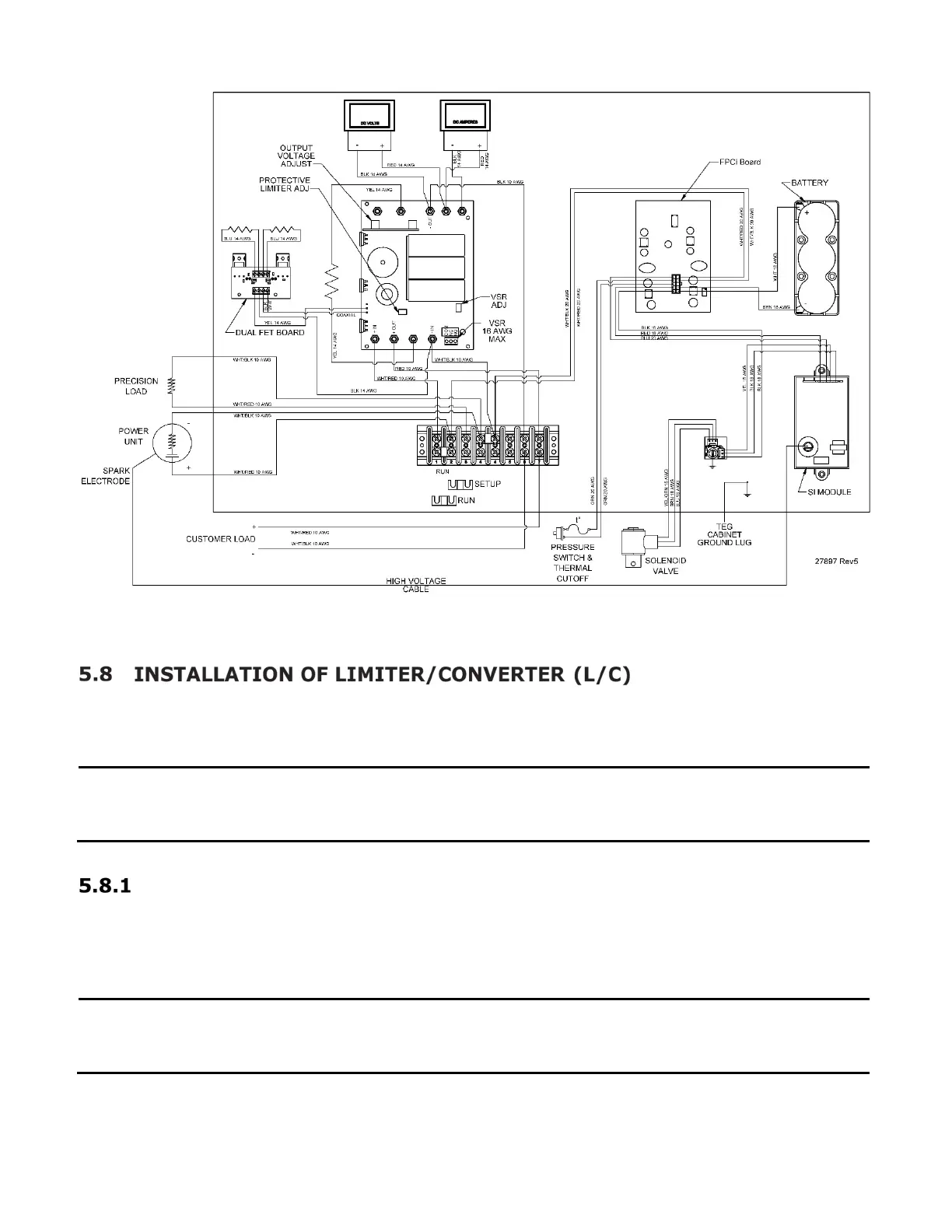
Figure 14 – Wiring Diagram 5220 TEG, with 24V L/C Assembly
The L/C is normally shipped ready for operation, attached to the TEG. If it was shipped
separately, install it as follows.
NOTE:
Before installing, inspect the electronics for obvious damage
components and advise
Gentherm Global Power Technologies (GPT) if
damage is found.
Attaching the L/C to the TEG
The standard mounting location is on the right side (when looking at the front of the TEG) of
the generator cabinet. To attach the L/C, remove the four nuts and lock washers provided
and bolt it to the outside of the TEG cabinet (Figure 15).
NOTE:
Always
mount the L/C in an upright position and allow the free flow of air
through the unit. Remote mounting of the L/C is acceptable. Contact GPT for
more information on remote mounting.



 To Next Page