81
CP30 INSTRUCTION MANUAL
Quiet Channel Menu
1. Press the programmed Quiet Channel Menu key to access the Quiet
Channel menu.
2. Rotate the Channel Selector knob or press the keys to tag or
untag the selected channel for Quiet SelCall operation.
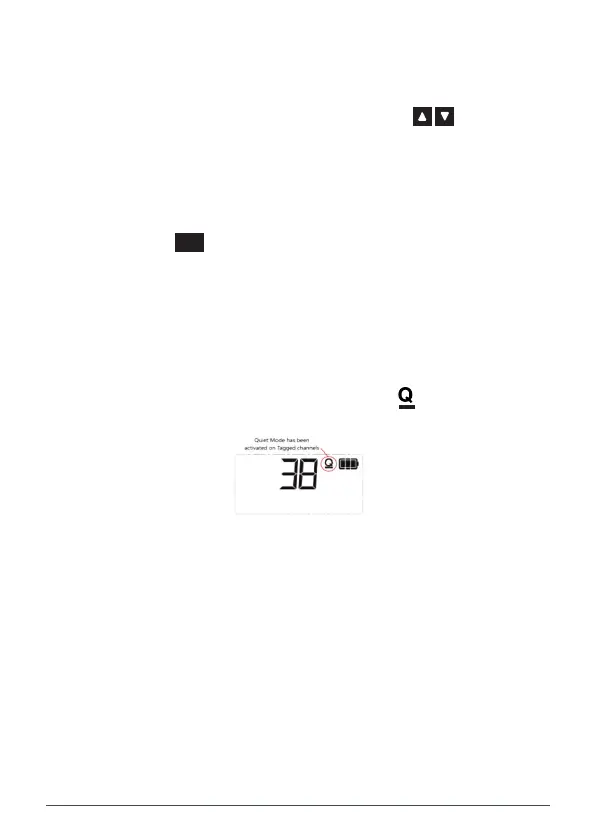
• Select ON to tag the selected channel. Q is displayed on the
selected channel
• Select OFF to un-tag the selected channel.Q disappears from
the selected channel.
3. Press the
MENU
F
key to exit or wait a few seconds for the menu to time-out.
Quiet
1. Select a channel that has been tagged for SelCall Quiet operation.Q
will be visible on that channel.
2. Press the programmed Quiet key to enable or disable the QUIET mode.
• Select ON to enable the QUIET mode. changes to on the
selected channel
• Select OFF to disable the QUIET mode. changes to Q on the
selected channel.
Set Channel To Key
Saves the selected channel and assigns it to a prespecied Recall Channel key.
1. Select the desired channel.
2. Press the programmed Set Channel To Key key. The selected channel
will be saved and assigned to a designated Recall Channel key.
NOTE: The specied Recall Channel key must also have been dened by the
dealer software.
To recall the channel, use the assigned Recall Channel key (as described below)
Recall Channel
Press the programmed Recall Channel key to immediately recall to a preset
channel. The recall channel may have been saved using the Set Channel To Key
option above or may have been preset by the dealer software.



 To Next Page