127
MDE-LEDI-1099V3.4
4.1.2. Conguración avanzada
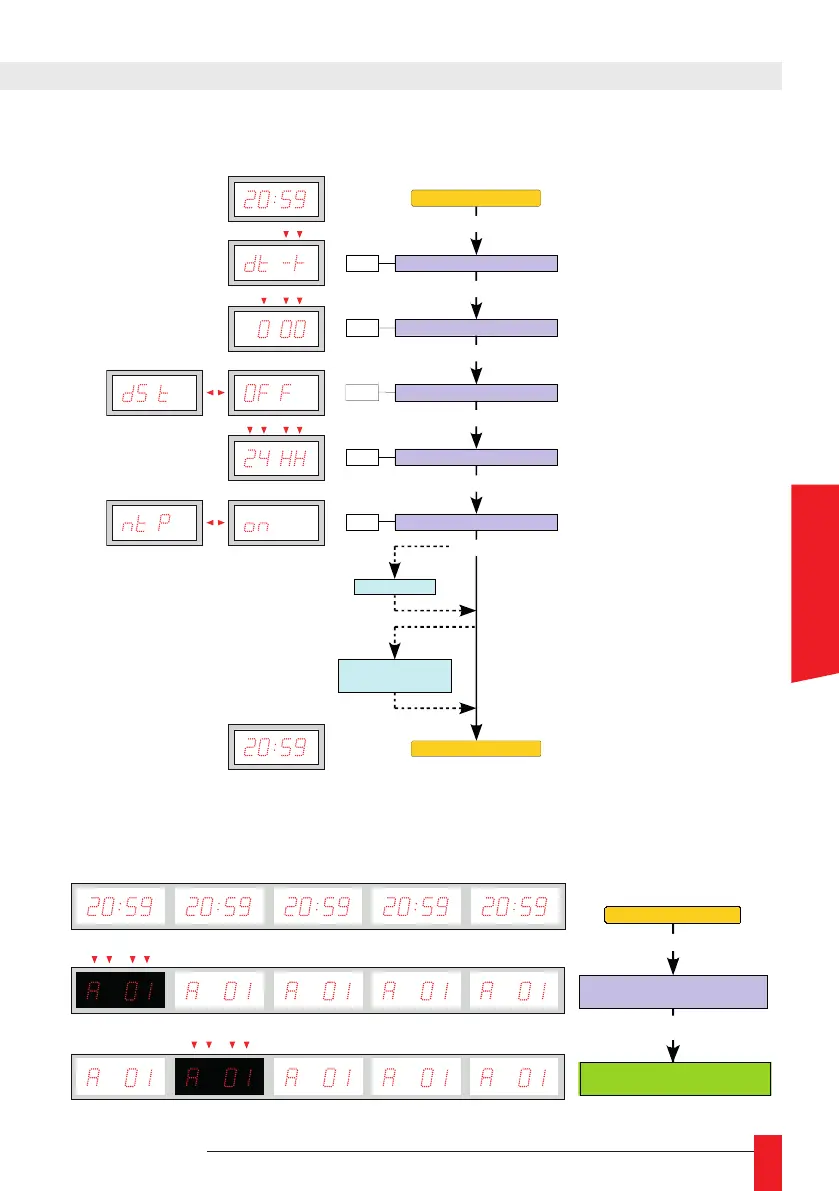
► Para cambiar de pantalla, en un LEDI
®
WORLD, LEDI
®
POOL
o LEDICA
®
, presionar el
botón PROG y visualizaremos la versión del reloj; en ese momento se está visualizando
la primera pantalla y presionando las techas +/- cambiaremos de pantalla.
Signo de offset
PROG 4 seg.
PROG
Valor del offset
PROG
Programación del DST
PROG
+ / -
+ / -
+ / -
OFF
: Sin hora de verano
EU
: Europa
US
: América del norte
AU
: Australia
Visualización fecha-hora
Visualización fecha-hora
Regulación sincronización
+ / -
PROG
Opción TOP y / o
Opción temperatura
PROG
Programación formato de hora
+ / -
12hh
: Modo 12 horas
24HH
: Modo 24 horas
AFnO (AFNOR)
: ON
↔
OFF
ASCII
: ON
↔
OFF
Ant (DCF / TDF)
: ON
↔
OFF
ntP
: ON
↔
OFF
rAdO (DHW)
: ON
↔
OFF
SMPt (SMPTE)
: OFF
EU (Europa)
US (
ÉEUU)
LEIC (Leitch)
IMP- (Impulsión serie)
IMPII (Impulsión paralelo)
: OFF
0100 (100 ms)
0200 (200 ms)
…
Opción SMPTE
Configuration matériel :
Adresse - Version logiciel
PROG
Affichage date - heure
Changement d'afficheur
(LEDI Pool - LEDI World - LEDICA)
+ / -
Configuración producto:
Dirección
-
Versión software
PROG
Visualización fecha
- hora
Cambio de visualización
(LEDI Pool - LEDI World - LEDICA)
+ / -
Hardware configuration:
Address - Software version
PROG
Date - time display
Change of display screen
(LEDI Pool - LEDI World - LEDICA)
+ / -
Gerätekonfiguration:
Adresse - Version logiciel
PROG
Anzeige Datum - Uhrzeit
Anzeigewechsel
(LEDI Pool - LEDI World - LEDICA)
+ / -
ESPAÑOL



 To Next Page