EasyManua.ls Logo

Gorgy Timing LEDI Series - Allgemeines; Einstellung Datum - Uhrzeit

Gorgy Timing LEDI Series
Print Icon
To Next Page IconTo Next Page
To Previous Page IconTo Previous Page
Loading...
174
MDE-LEDI-1099V3.4
4.1. ALLGEMEINES
LEDI
®
WORLD LEDI
®
POOL
LEDICA
®
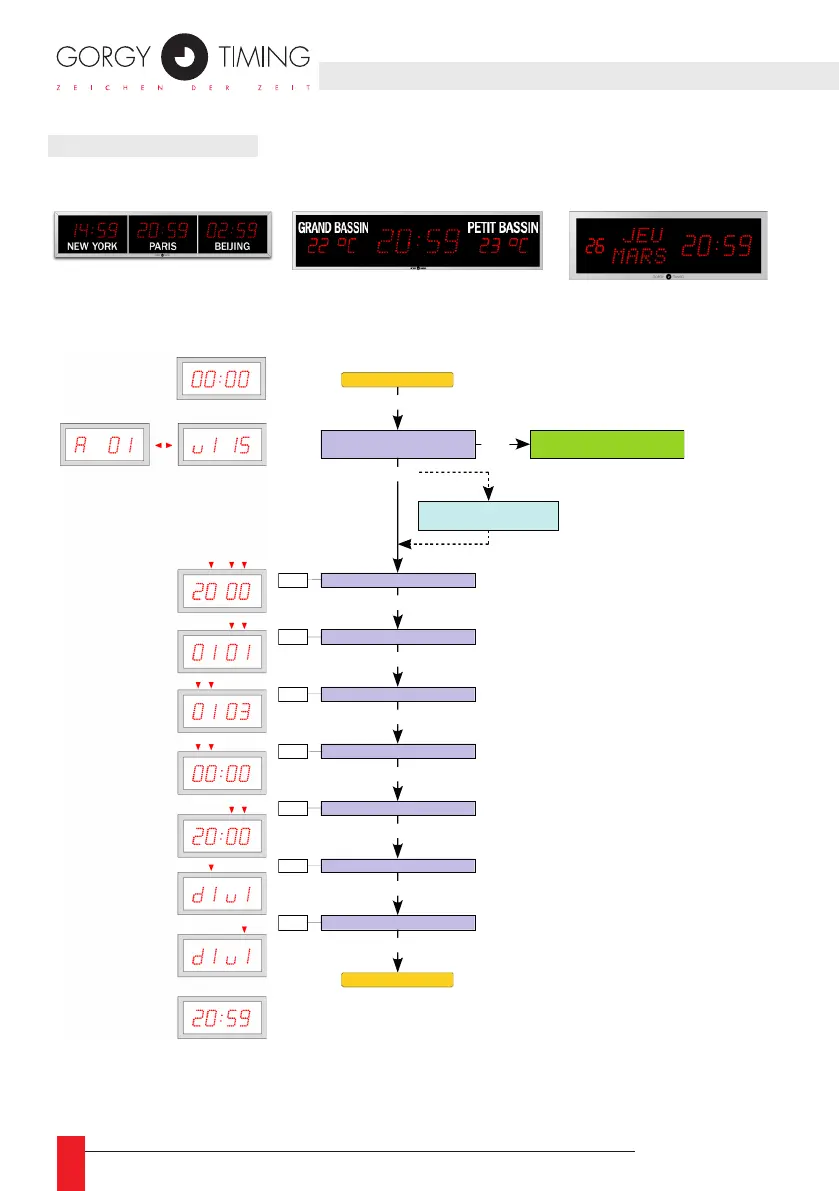
4.1.1. Einstellung Datum - Uhrzeit
Getekonfiguration :
A
dresse – Softwareversion
Einstellung des Jahres
Einstellung des Monats
PROG (1Sek)
PROG
PROG
PROG
Einstellung des Tages
PROG
Einstellung der Stunden
PROG
Einstellung der Minuten
PROG
Einstellung Ziffernfarbe (Std. Min.)
PROG
Einstellung Sekundenkreisfarbe
PROG
+ / -
+ / -
+ / -
+ / -
+ / -
+ / -
+ / -
d1 : Rot
d2 : Amber
d3 : Grün
v1 : Rot
v2 : Amber
v3 : Grün
A
nzeige Datum - Uhrzeit
Opt. im Wechsel Datum-Uhrzeit
und / oder Temperaturoption
A
nzeige Datum - Uhrzeit
+ / -
Anzeigewechsel
Diese Einstellung hat keinen
Einfluss auf Modelle ohne
Sekundenkreis.
(LEDI Pool - LEDI World - LEDICA)
Wechselanzeige

Table of Contents

Related product manuals