81
MDE-LEDI-1099V3.4
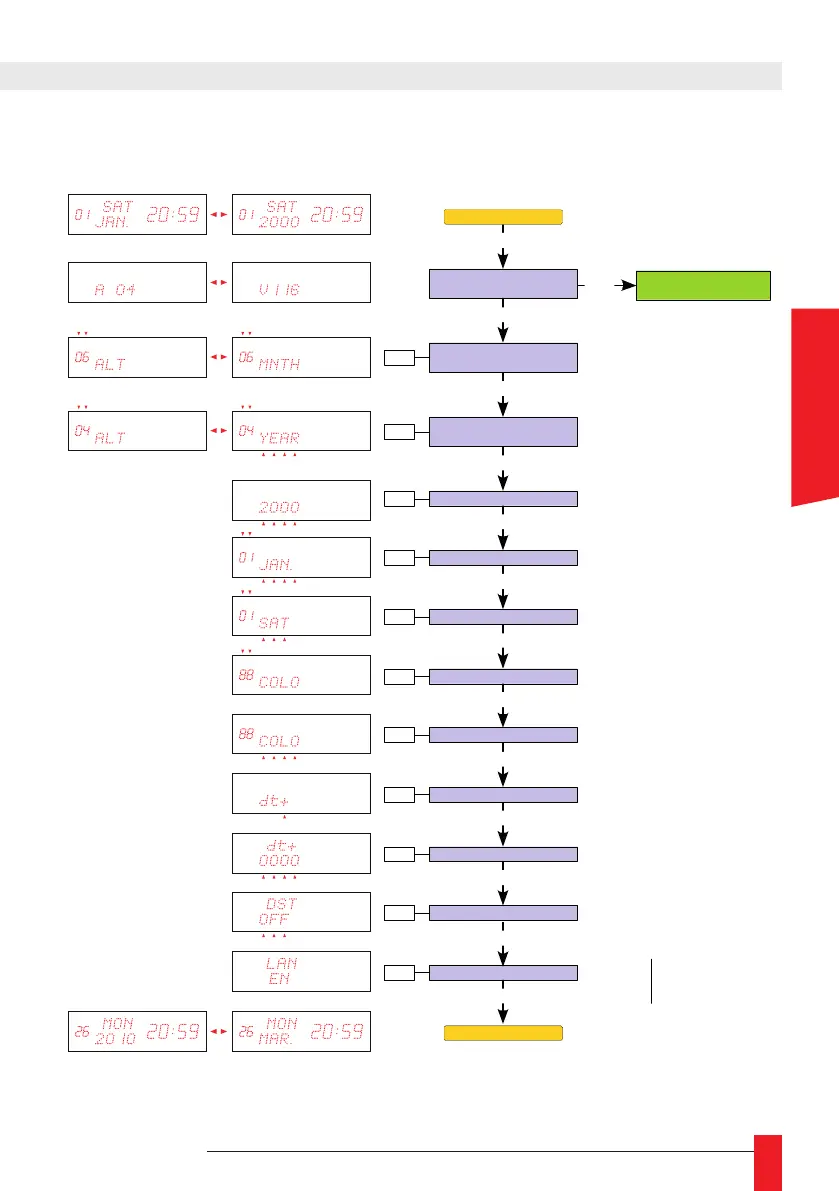
4.2.3. Setting the calendar
Hardware configuration:
Address - software version l
Alternation time for
displaying the month
PROG
PROG
PROG
Alternation time for
displaying the year
PROG
Year setting
+ / -
+ / -
+ / -
Display time of month (in seconds)
Set to 0 if you don't want to display
Displaying time of the year (in seconds)
Set to 0 if you don't want to display
Date -- Time display
PROG
Month setting
PROG
Digit colour setting
PROG
Matrix colour setting
PROG
+ / -
+ / -
+ / -
PROG
Day number setting
+ / -
DST setting
+ / -
Language setting
+ / -
PROG
Offset sign setting
PROG
+ / -
Offset value setting
PROG
+ / -
000 : No offset
030 : 30 minutes
100 : 1 hour
...
dt+
: Offset positive
dt-
: Offset negative
OFF
: No DST
EU
: Europe
US
: North America
A
U
: Australia
FR
: French
EN
: English
DE
: German
ES
: Spanish
IT
: Italian
PT
: Portuguese
NO
: Norwegian
N
L
: Dutch
FL
: Flemish
SE
: Swedish
Date -- Time display
FI
: Finnish
D
K
: Danish
RU
: Russian
CA
: Catalan
+ / -
Change calendar setting
→
hour / minute
PROG
ENGLISH



 To Next Page