78
MDE-LEDI-1099V3.4
4.1. GENERAL INFORMATION
LEDI
®
WORLD LEDI
®
POOL
LEDICA
®
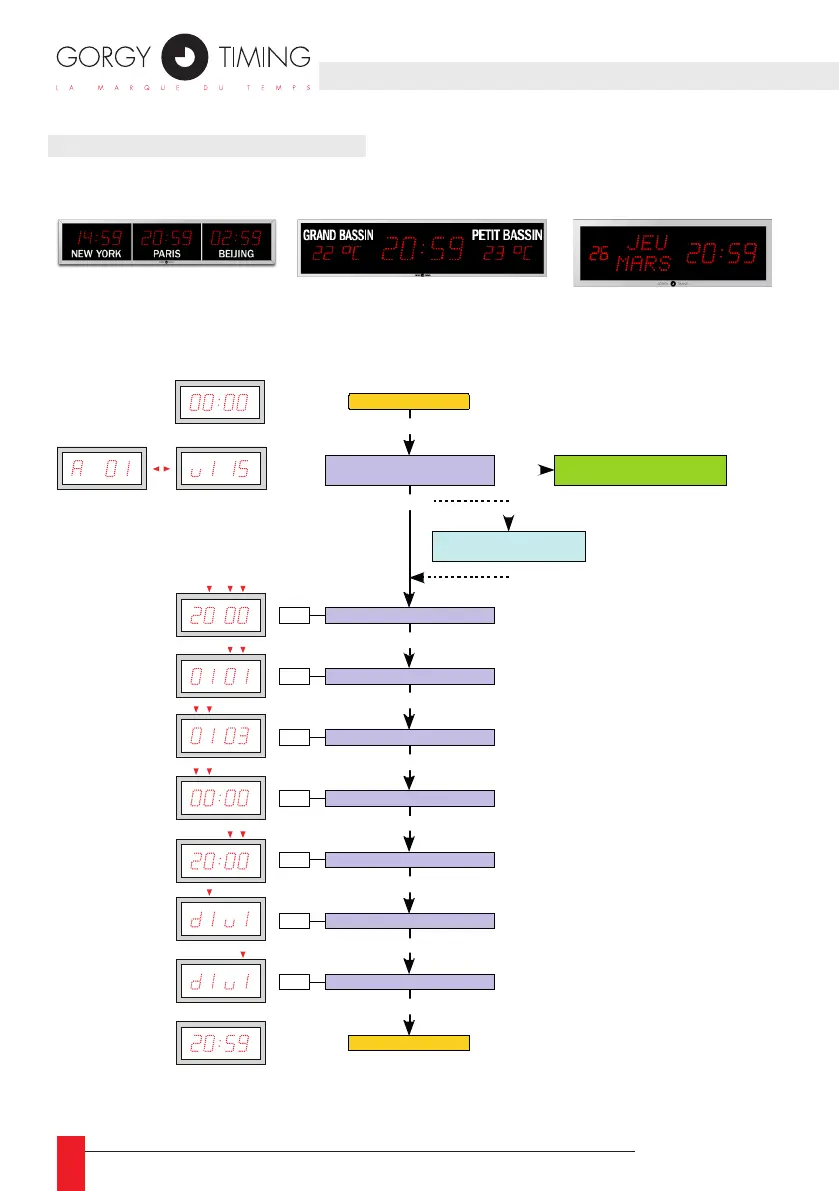
4.1.1. Setting the date and time
Hardware configuration:
Address – Software version
Set year
Set month
PROG
PROG
PROG
PROG
Set day
PROG
Set hour
PROG
Set minutes
PROG
PROG
Set wave colour
PROG
+ / -
+ / -
+ / -
+ / -
+ / -
+ / -
+ / -
d1 : Red
d2 : Yellow
d3 :
Green
v2 : Yellow
v3 :
Green
Date – time display
Date – Time alternation option
and / or température opti on
Date – time display
+ / -
Change of display sc reen
(LEDI Pool - LEDI World - LEDICA)
The setting has no effect
on versions without the wave



 To Next Page