79
MDE-LEDI-1099V3.4
4.1.2. Advanced settings
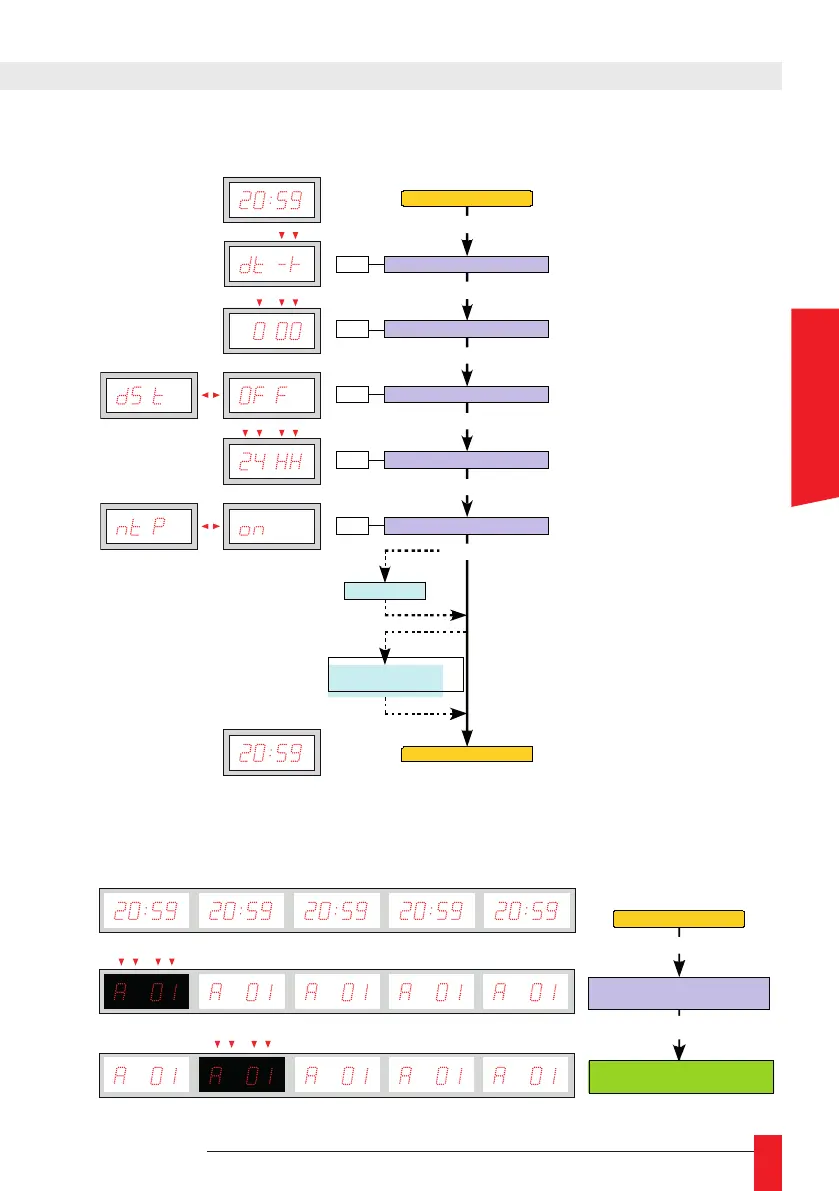
► To switch between display screens on a LEDI
®
WORLD, LEDI
®
POOL
ou LEDICA
®
, press
PROG button on the clock, the version of rmware will be displayed, the rst display
screen is selected for setting. If you want to switch to another display screen, press +/-
button to select the display to be set.
Offset sign
PROG 4 sec.
PROG
Offset value
PROG
Setting of DST
PROG
+ / -
+ / -
+ / -
OFF
: No DS T
EU
: Europe
US
: North Amer ica
AU
: Australia
Date – time display
Date - time display
Synchronisation setting
+ / -
PROG
Beep option and / or
temper ature option
PROG
Setting of time format
+ / -
12hh
: 12- hour mode
24HH
: 24 hour mode
AFnO (AFNOR)
: ON
↔
F
ASCII
: ON
↔
F
Ant (D CF / TDF)
: ON
↔
F
ntP
: ON
↔
rAdO (DHW )
: ON
↔
F
SMPt (SMPTE)
: OFF
EU (Europe)
US (
État s-Unis
)
LEIC (Leitch)
IMP- (Serial im pulse)
IMPI I (parallel impulse)
: OFF
0100 (1 00 ms)
0200 (2 00 ms)
…
SMPTE Op tion
Configuration matériel :
Adresse - Version logiciel
PROG
Affichage date - heure
Changement d'afficheur
(LEDI Pool - LEDI World - LEDICA)
+ / -
Configuración producto:
Dirección
-
Versión software
PROG
Visualización fecha
- hora
Cambio de visualización
(LEDI Pool - LEDI World - LEDICA)
+ / -
Hardware configuration:
Address - Software version
PROG
Date - time display
Change of display screen
(LEDI Pool - LEDI World - LEDICA)
+ / -
Gerätekonfiguration:
Adresse - Version logiciel
PROG
Anzeige Datum - Uhrzeit
Anzeigewechsel
(LEDI Pool - LEDI World - LEDICA)
+ / -
ENGLISH



 To Next Page