EasyManua.ls Logo

Gorgy Timing LEDI Series - LEDICA Model

Gorgy Timing LEDI Series
Print Icon
To Next Page IconTo Next Page
To Previous Page IconTo Previous Page
Loading...
80
MDE-LEDI-1099V3.4
4.2. LEDICA
®
MODEL
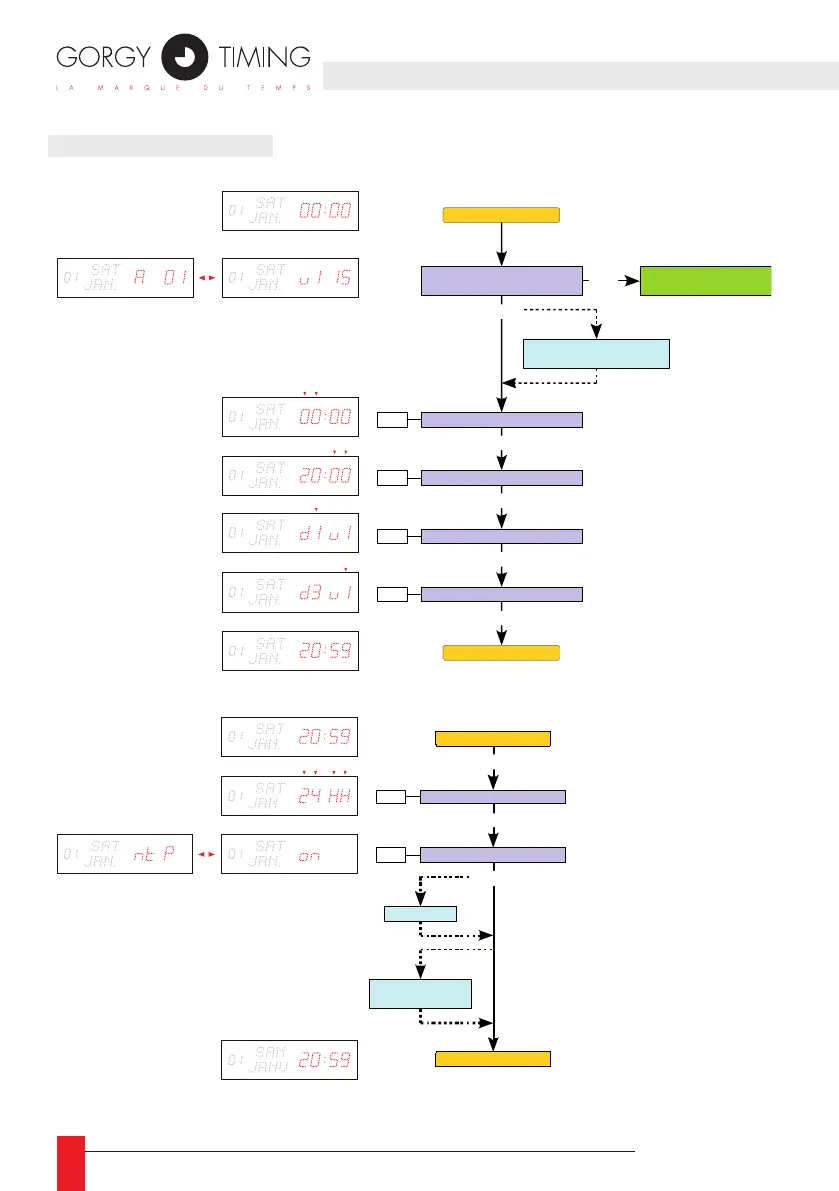
4.2.1. Setting hours and minutes
4.2.2. Advanced settings
Hardware configuration:
Address - software version
PROG
Hours setting
PROG
Minutes setting
PROG
Digital colour setting
PROG
Wave colour setting
PROG
d1 : Red
d2 : Amber
d3 : Green
v1 : Red
v2 : Amber
v3 : Green
+ / -
+ / -
+ / -
+ / -
PROG
This setting has no effect on
versions without the wave
Date Time Display
Date Time Display
+ / -
Change setting
hour / minute
calendar
Date -- time alternation option
And/or temperature option
PROG 4 sec.
PROG
Date Ti me Display
Date -- Time
display
Sync hronisation setting
+ / -
Setting of ti me format
+ / -
12 hh
: 12 hour mode
24 HH
: 24 hour mode
AFnO (AFN OR )
: ON
OFF
ASCII
: ON
OFF
Ant (DCF / TDF)
: ON
OFF
ntP
: ON
OFF
rAdO (DHW)
: ON
OFF
SMPt (SMPTE )
: OF F
EU (Europ e)
US (
Un ited Stat
es )
LEIC (Leitc h)
IMP- (seria l impu lse)
IMPII (
pa rallel impulse)
: OF F
0100 (100 ms)
0200 (200 ms)
PROG
Beep option and / or
temperatur e option
SMPT E option

Table of Contents

Related product manuals