User Manual 9065/9065plus
MAN10772-00 100
Paper Specifications
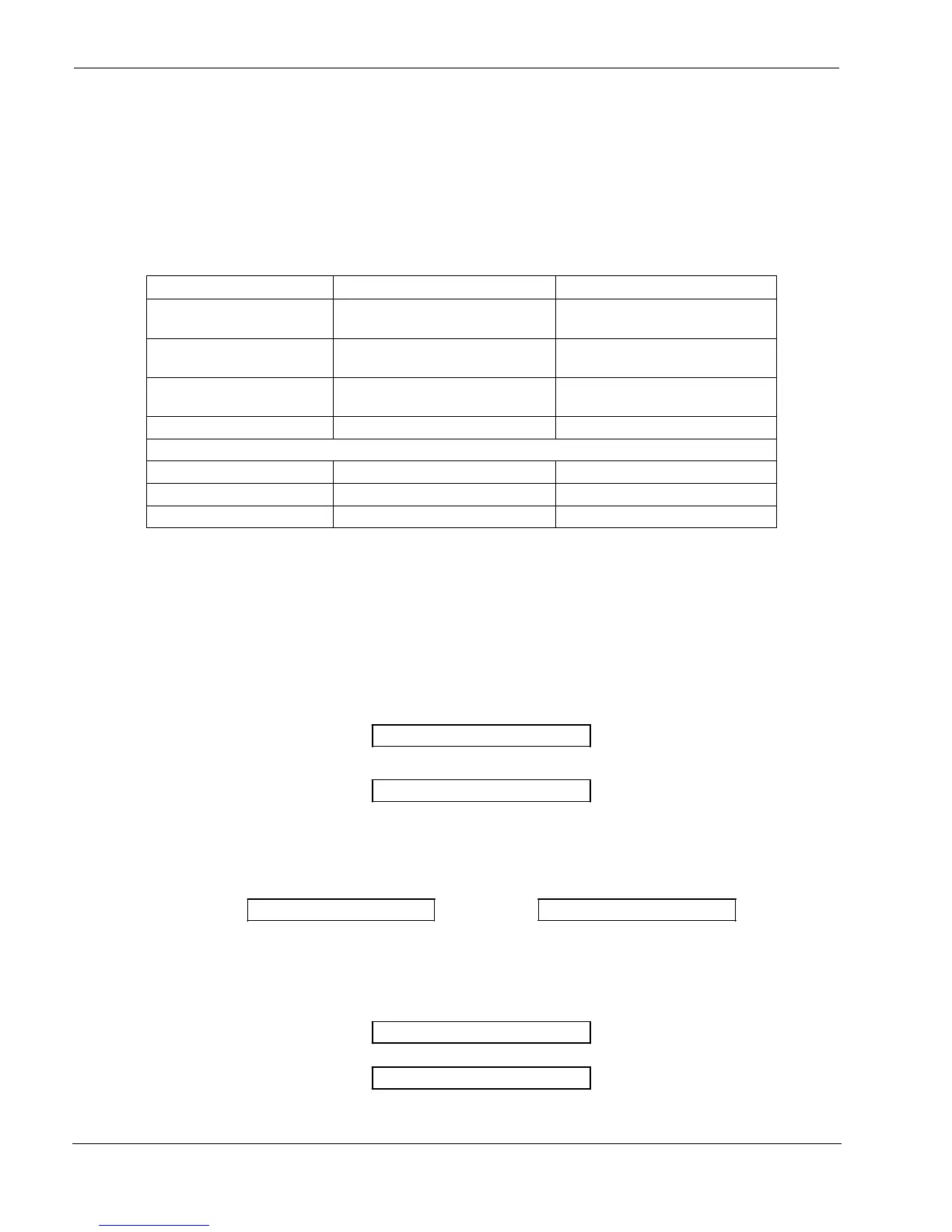
It is important to use the correct paper for obtaining the best performance. See the information table below:
Fanfold Paper
Loading
Mode
Front1
Tractor Front2
Tractor
option
Width 76 to 432 mm
3 to 17 inches
76 to 432 mm
3 to 17 inches
Length 76 to 609 mm
3 to 24 inches
76 to 609 mm
3 to 24 inches
Thickness max. 0.635 mm
0.025 inches
max. 0.635 mm
0.025 inches
Copies 1 + 7 1 + 7
Weight (g/m2):
Original 55 to 150 55 to 150
Other sheets 45 to 75 45 to 75
Carbon Paper 35 35
Fanfold Paper Loading
L
L
o
o
a
a
d
d
i
i
n
n
g
g
P
P
a
a
p
p
e
e
r
r
U
U
s
s
i
i
n
n
g
g
t
t
h
h
e
e
F
F
r
r
o
o
n
n
t
t
1
1
P
P
u
u
s
s
h
h
T
T
r
r
a
a
c
c
t
t
o
o
r
r
1. To select the Front1 push tractor paper path, press the
PATH
key. The display shows:
LOAD FRONT1
If you have been using a different path, the display shows:
PATH CHANGING
If you have been using fanfold paper in the Front2 push tractor paper path (if the Front2 push tractor
option is installed), the printer automatically starts the parking procedure. The display shows
alternately:
TEAR IF NECESS. and PARK PAPER
Tear off the fanfold loaded with the Front2 push tractor (if it is longer than 18 inches) and press the
PARK
key. The display shows:
PARKING
followed by
LOAD FRONT1



 To Next Page