User Manual 9065/9065plus
MAN10772-00 28
UNIX Environment
To configure the printer in Unix environment, you have to run the “cmpwizard.sh” script from the drivers\unix
directory included in this CD-ROM , except for Linus 7.x and Solaris 7.x operating systems described later in this
section.
Port Installation & Configuration
Check that the Printer is powered on and the Green Power led of the LAN Interface Port is lit.
It is necessary to be SUPER USER
Insert the Compuprint Ethernet LAN CD-ROM.
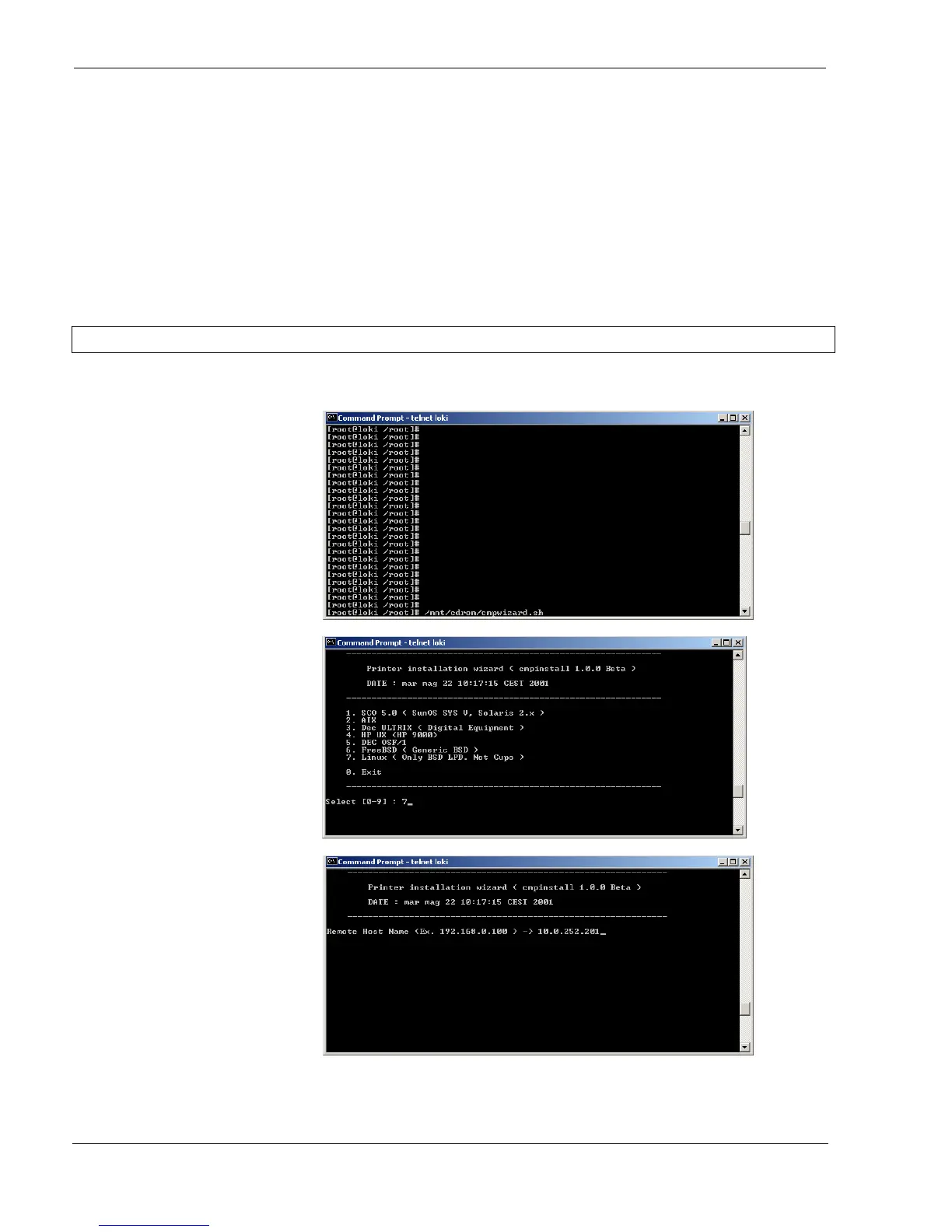
1. From the shell bush, run the
“cmpwizard.sh” script from the
drivers\unix directory included
in the CD-ROM labeled
Compuprint Ethernet LAN. See
the following screen:
2. Select the operating system
(n.7).
3. Add the IP address. This
address must match the IP
address selected in the INIT IP
ADDRESS parameter of the
LAN INTERFACE item in the
Power-On
Configuration setup.



 To Next Page