User Manual 9065/9065plus
MAN10772-00 112
Clearing Forms Jams
Use the followin
rinter
1. Open the top cover
2. Tear off the forms at perforations before it enters the printer and after it exits the printer.
3. Open the tractor doors and remove forms from the tractors.
4. Try to move the printhead off of the form and to the far right. Do not force it.
5. Remove jammed forms by pulling in the direction of printing.
6. If the jam cannot be removed, lightly pull the form in the opposite direction.
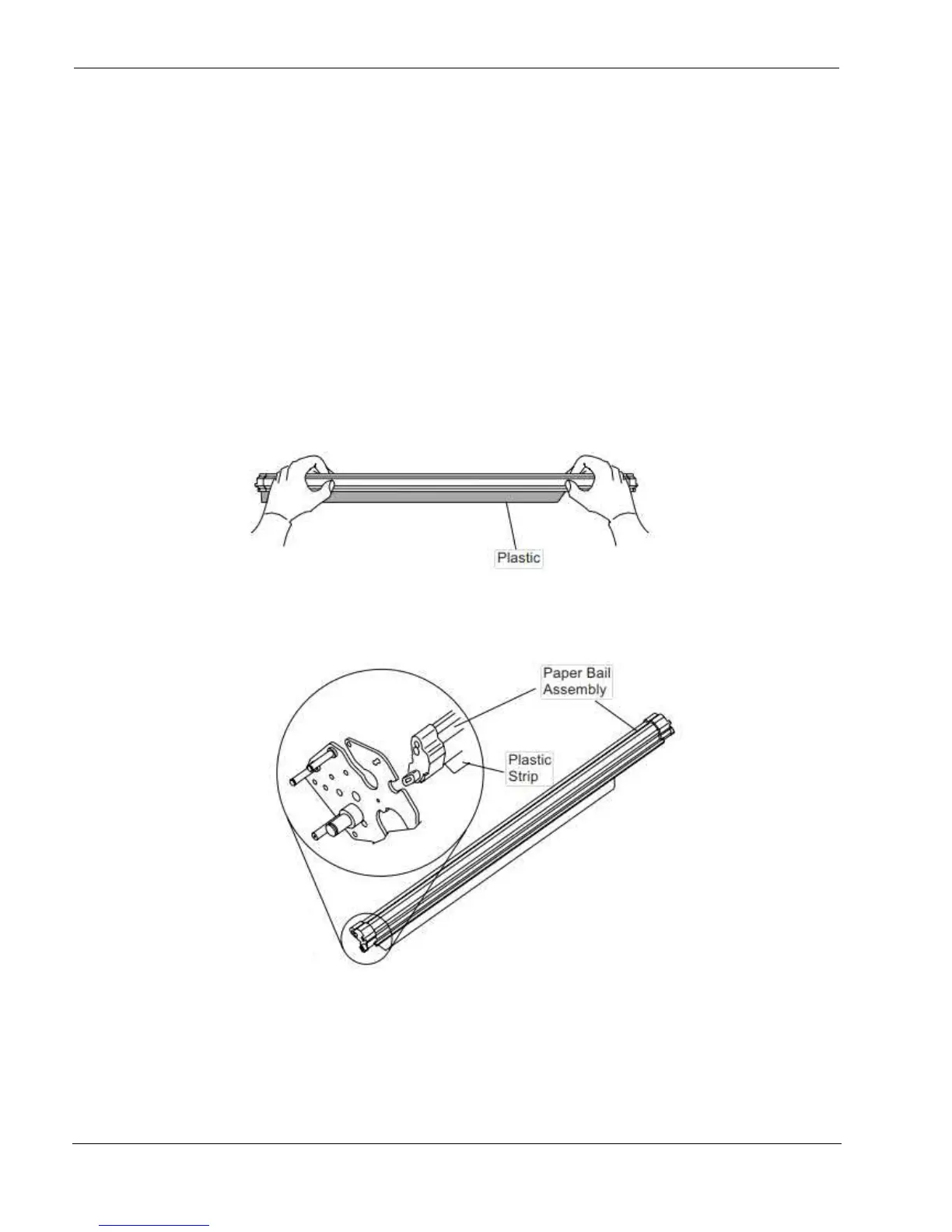
7. If the jam still cannot be removed, remove the paper bail assembly:
a. Remove the ribbon cartrid
e.
b. Grip the bail assembly and rotate it toward the front of the printer until the pivot posts on the sides
disen
e from the printer frame.
c. Lift the bail assembl
out of the printer and set it aside.
d. Remove
ou removed the paper bail assembl
in the previous step, reinstall it, as follows:
a. Grip the bail assembl
illustration.
Important!
To avoid dama
the plastic, ensure the plastic points down.
b. Insert the left and ri
ht paper bail end cap pivots into the side frames as indicated in the fi
o.
d. Reinstall the ribbon cartrid



 To Next Page