19
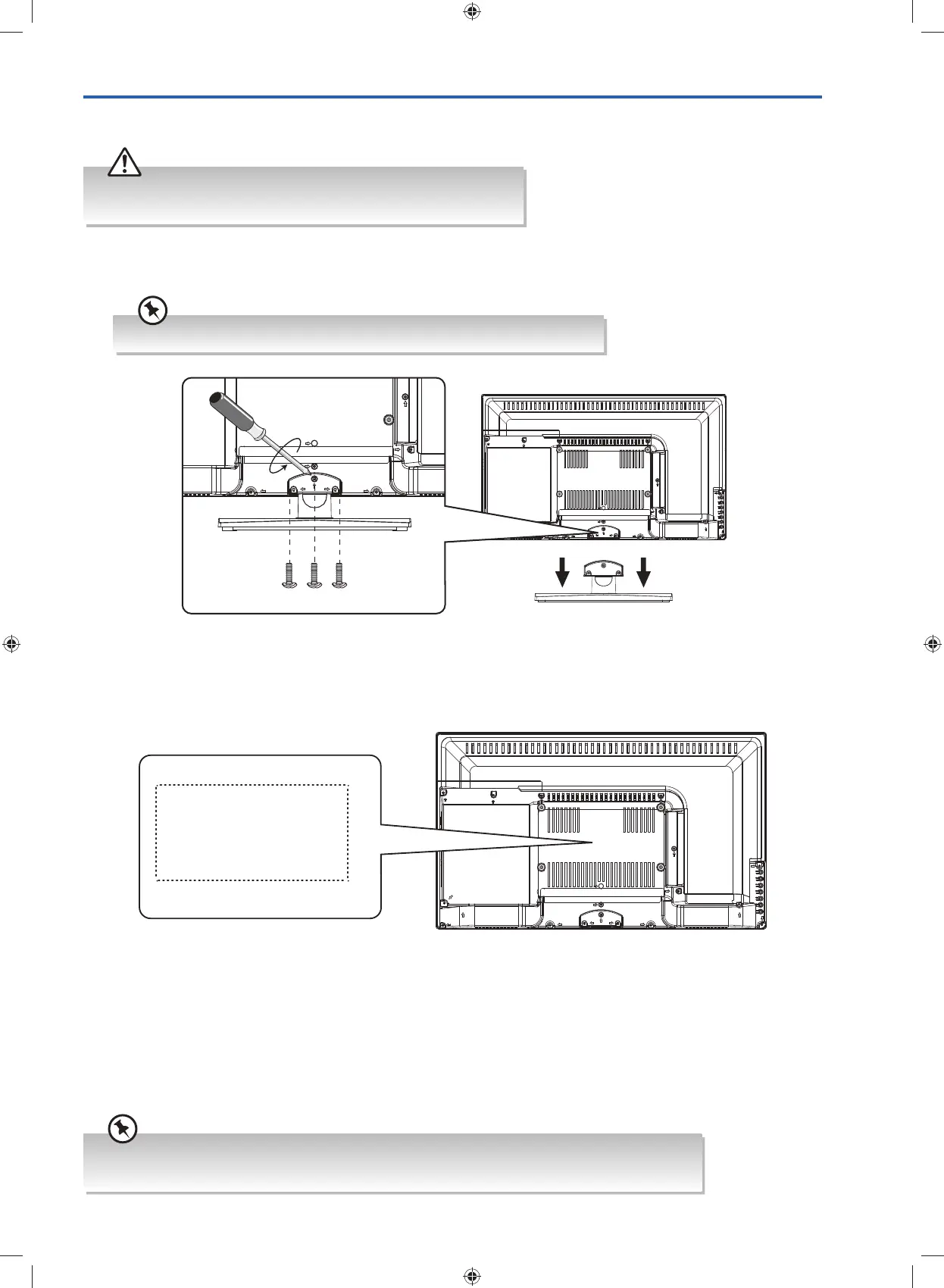
1. To remove the stand assembly, untighten the screws holding the stand assembly to the rear of the TV. Slide the stand
assembly out.
2. Mounting on the wall. This TV is designed to be wall-mounted with a standard 200 mm x 100 mm mounting kit (sold
separately) designed for flat-panel TVs. Mount this TV according to the instructions included in the mounting kit. Due to
space restrictions, we recommend that you make all connections (refer to page 20-23 and page 50 for details) before
mounting on to the wall.
Mounting the TV to a Wall
Screw x 3
unscrew
200 mm
100 mm
Four mounting holes
(size M4 screw, included)
• Remove the stand assembly before mounting the TV onto the wall.
• It is recommended that two people take part in the installation.
Keep all the spare screws should you want to use the stand assembly option.
• Please read this instruction manual carefully while setting up your TV.
• If you require additional assistance, please call our customer care center on 1300 725 885.
G24HTC16_IB_160630-V2_Annie.indd 19 30/6/16 下午6:06



 To Next Page