1176LE008146B
Alarm management
7.6 Advanced protection alarms
The advanced protection alarms display a message pop-up on the sentinel Energy display and
the panel display.
The pop-up must be acknowledged.
Message windows on the sentinel Energy display
Step/Action Button Display
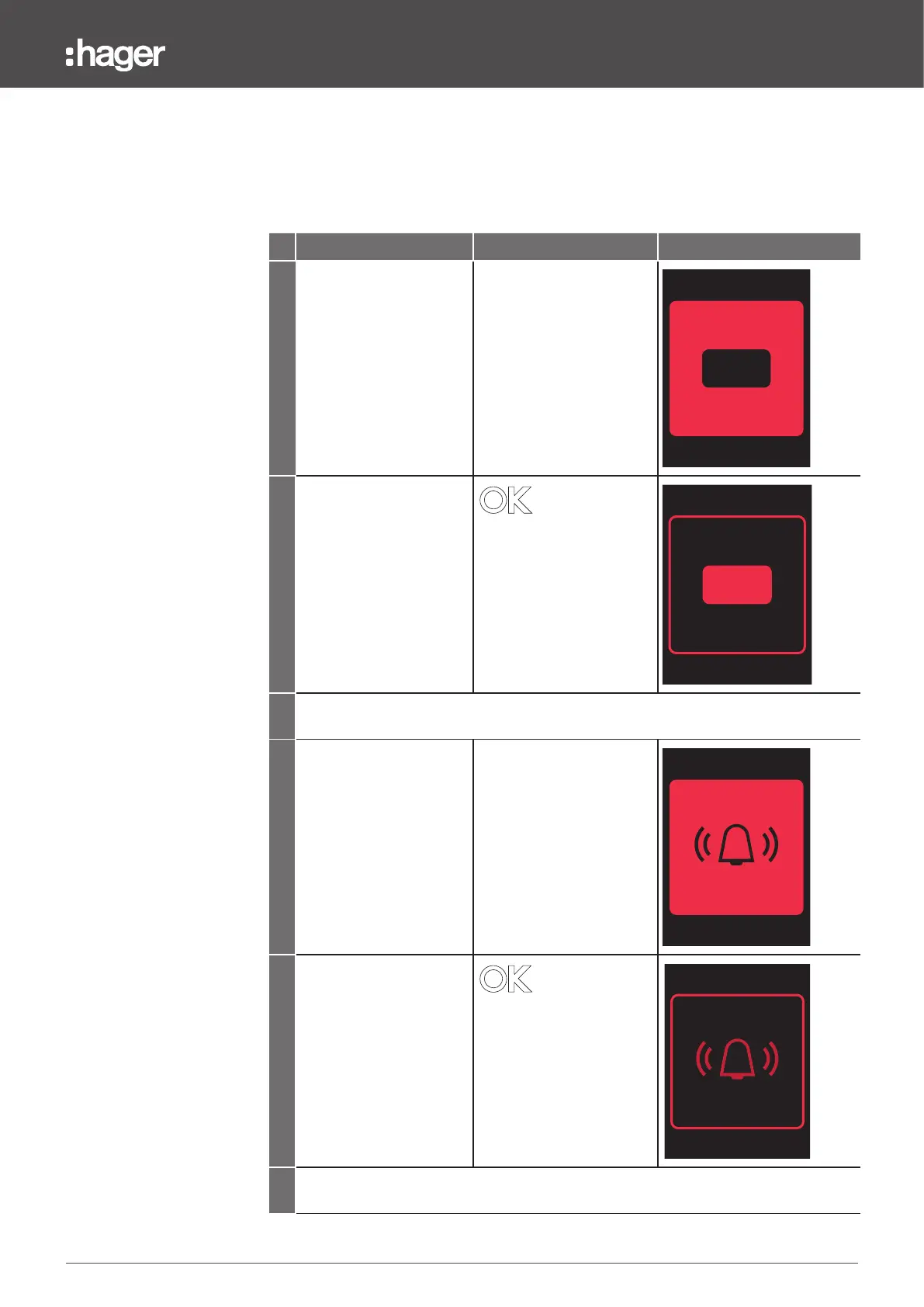
1 If the alarm is configured
to “Trip” it will display the
following flashing message
pop-up.
TRIP
2 Briefly press the trip unit's
OK button to hold the
pop-up and display the
message.
UV-27
TRIP
U12: 210 V
22/04/2022 -
18:20:25
3 Do a long press on the OK button for more than 3 seconds to acknowledge and close
the pop-up after having resolved the trip fault.
4 If the alarm is configured
to "Alarm" it will display
the following flashing
message pop-up.
5 Briefly press the trip unit's
OK button to hold the
pop-up and display the
message.
UV-27: U< 190 V
22 April 2022
-
ADVANCED
15:26:32
6 Do a long press on the OK button for more than 3 seconds to acknowledge and close
the message.


 To Next Page