5 - Operation
5.10
Home Screen After Configuration
The Home screen will appear when:
• Equipment Operating Configuration is created.
• Grower, Farm and Field are selected for that configuration.
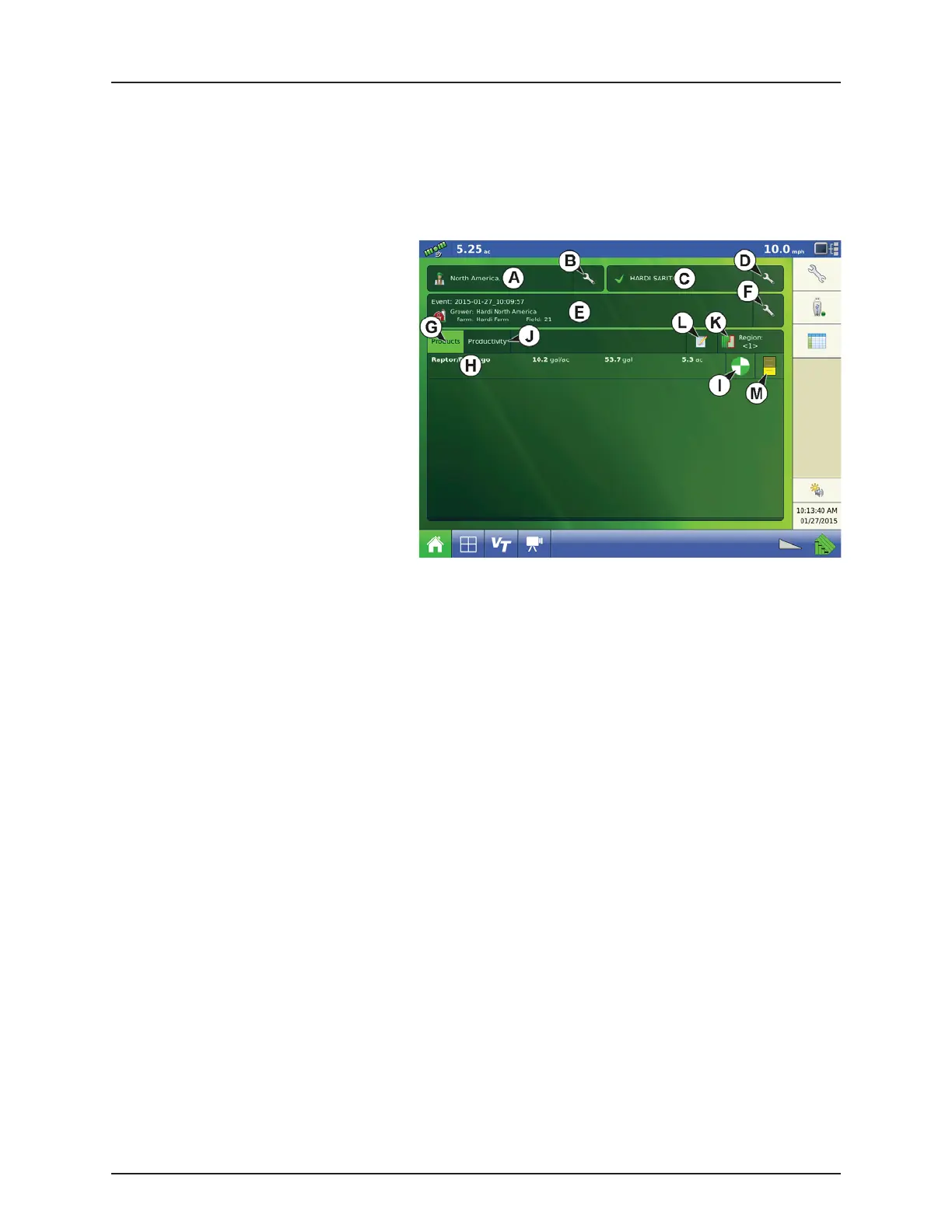
Status for current Event is shown on the Home screen. Currently used Products information is shown. Press the buttons listed
below to get additional information:
A. Operator Selection, see “Headlands” on
page 5.14.
B. Edit Operator, see “User Setup button (Edit
User)” on page 4.56.
C. Operating Configuration.
D. Configuration Setup, see “Configuration
Setup Screen” on page 5.1.
E. Event Setup, see “Setup Event” on page 5.5.
F. Event Options.
G. Products Tab. Selects detail of products, rates
and area covered to show below.
H. Product Selection. Shortcut to change
products.
I. Rate Control Settings. Shortcut to change
rates.
J. Productivity Tab. Selects detail of speed, time, area covered, and distance travelled to show below.
K. Region Options. Shortcut to change Region, see “Region button:” on page 5.9.
L. Field Notes. Press to enter details regarding current spray job, see “Field Notes button:” on page 5.9.
M. Container info. Shortcut to change content.



 To Next Page
 Loading...



