5 - Operation
5.11
Work Screen Operations
ATTENTION! For detailed information on Work Screen operations, see “Work Screen” on page 3.5.
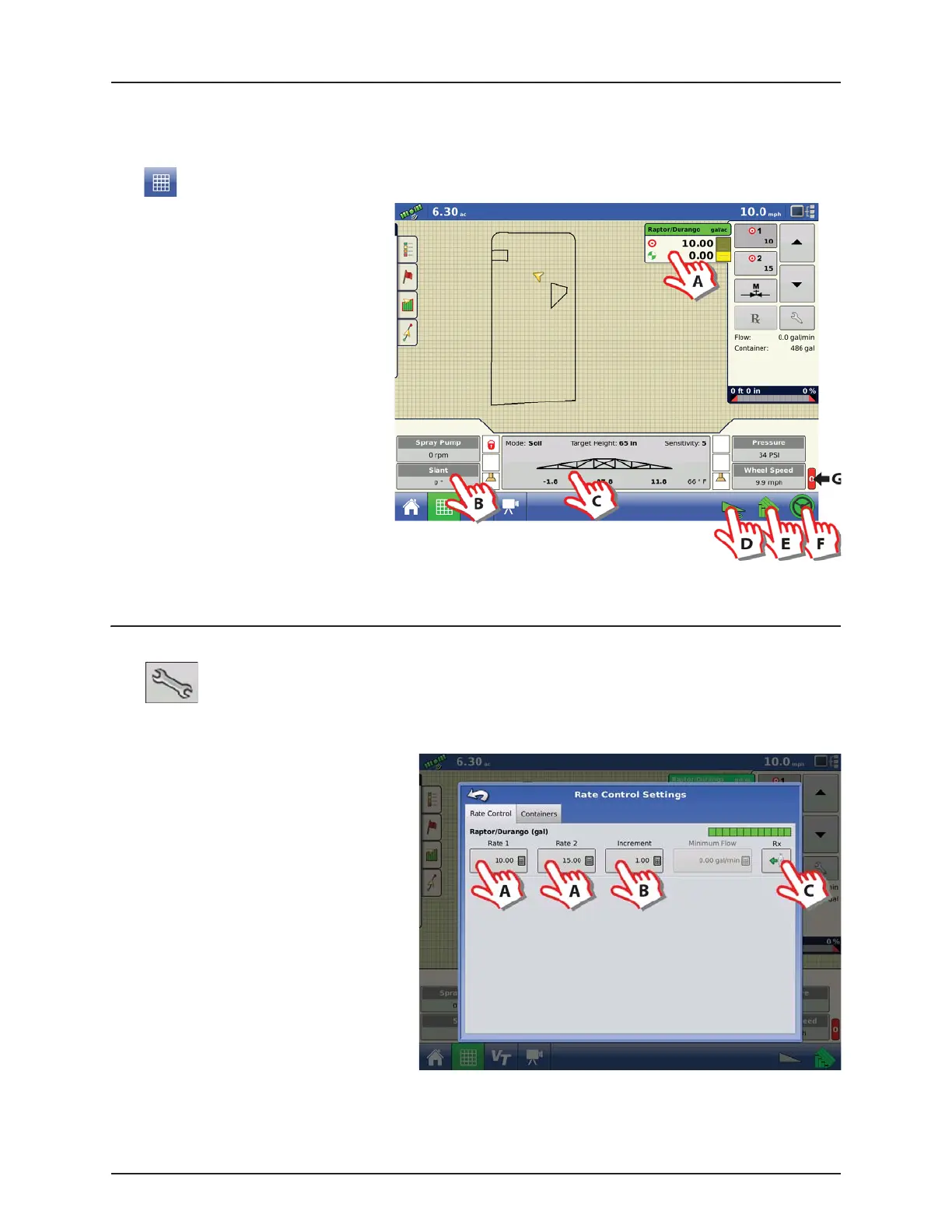
Press to get to the Work Screen:
A. Press to expand/collapse “Rate Control”
menu, see “Rate Control Settings” on
page 5.11.
B. Press to enter “Display Item Selection”,
see “Display Item Selection” on
page 5.12.
C. Press to enter “Boom Height Control
Options”, see “Boom Height Control
Options” on page 5.13.
D. Press to activate
AutoTerrain/AutoHeight/AutoSlant, see
“AutoTerrain/AutoHeight/AutoSlant
button” on page 3.6.
E. Press to activate AutoSectionControl, see
“AutoSwath Button” on page 3.6.
F. Press to activate AutoSteer, see
“AutoSteer Button” on page 3.6.
G. Main ON/OFF status, see “Master Switch
Status” on page 3.6.
Rate Control Settings
Press to enter the menu:
Rate Control tab
A. Press to change Application Rates.
B. Press to change the Target Rate Increment.
C. Press to import a Prescription.
ATTENTION! Setting the Application Rates
in this menu will automatically change the
Volume Rate at the VT screen. But changing
the Volume Rate in the VT will not affect this
menu.


 To Next Page
 Loading...



