Chapter 2 Installing the ProStream 9100
© 2016 Harmonic Inc. All rights reserved. 38 ProStream 9100 Release 17.5, Rev A
Back Panel LEDs
NOTE: When the device is first powered up, the power light is green and the local light is yellow. If the
device is not configured, the Fault and Activity lights do not indicate anything.
Back Panel LEDs
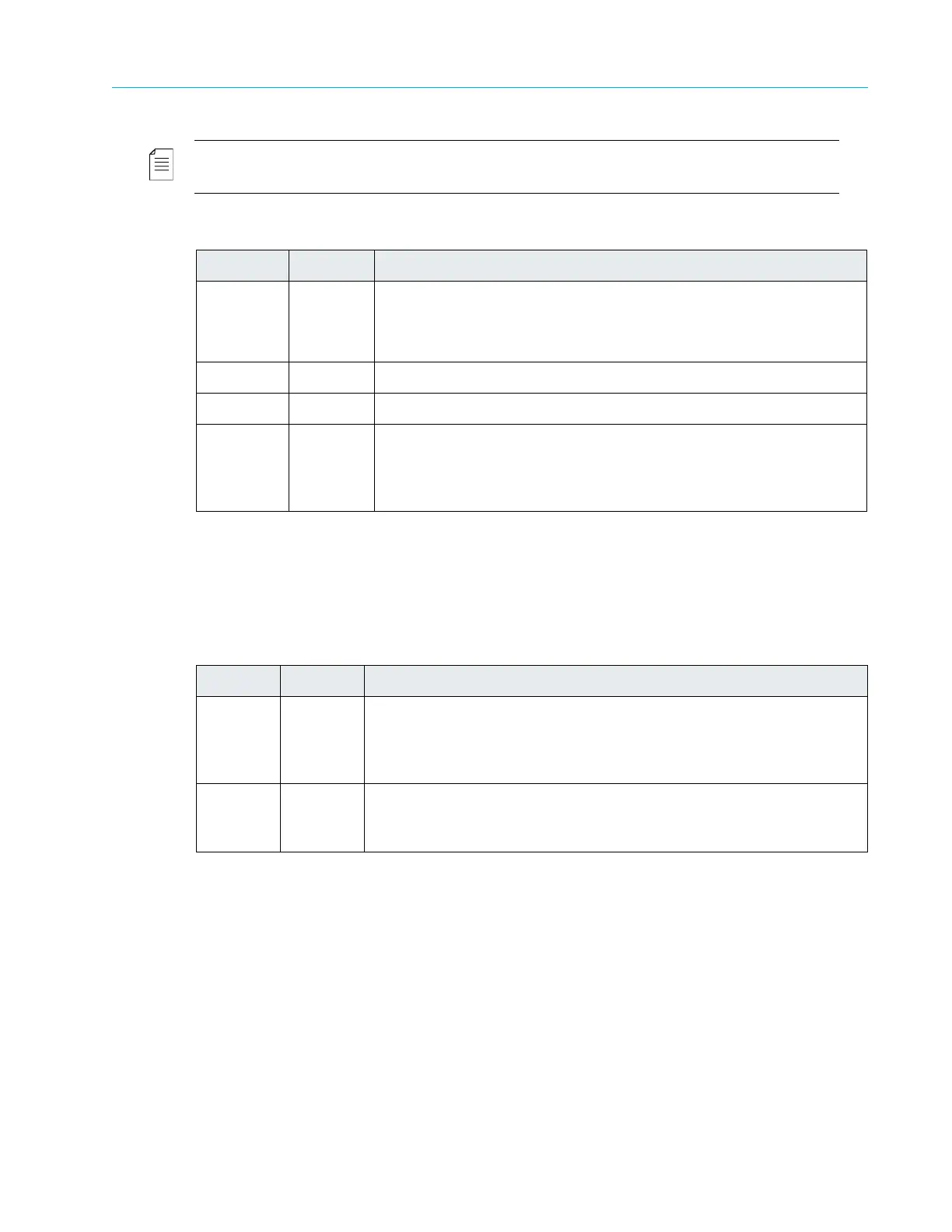
The back panel contains two LEDs on the main board. Table 2–5 describes the LEDs located on
the main board.
Table 2–4: Front Panel LEDs
LED Color Description
Power Yellow The Power LED is yellow while the device initializes after startup.
Green The Power LED turns green when the device initialization is
complete and the management interface is enabled and ready.
Fault Red The Fault LED lights when the application software detects an alarm.
Local Yellow The Local LED lights when the device is operating in local mode.
Tx Yellow The Tx LED lights when the device generates an MPEG-2 transport
stream. It blinks slowly when MPEG packets are being transmitted
steadily. It blinks fast or intermittently when the transmission rate is
slow or intermittent.
Table 2–5: Rear Panel Main Board LEDs
LED Color Description
Locator Blue
The Locator LED lights when this device is enabled through NMX
or SAG.
Use the Locator LED to help you identify a specific chassis in a
rack.
Fault Red
The Fault LED lights when the application software detects an
alarm.
The front panel and back panel Fault LEDs light at the same time.



 To Next Page