Chapter 3 Operating the ProStream 9100
© 2016 Harmonic Inc. All rights reserved. 40 ProStream 9100 Release 17.5, Rev A
Using the Front Panel
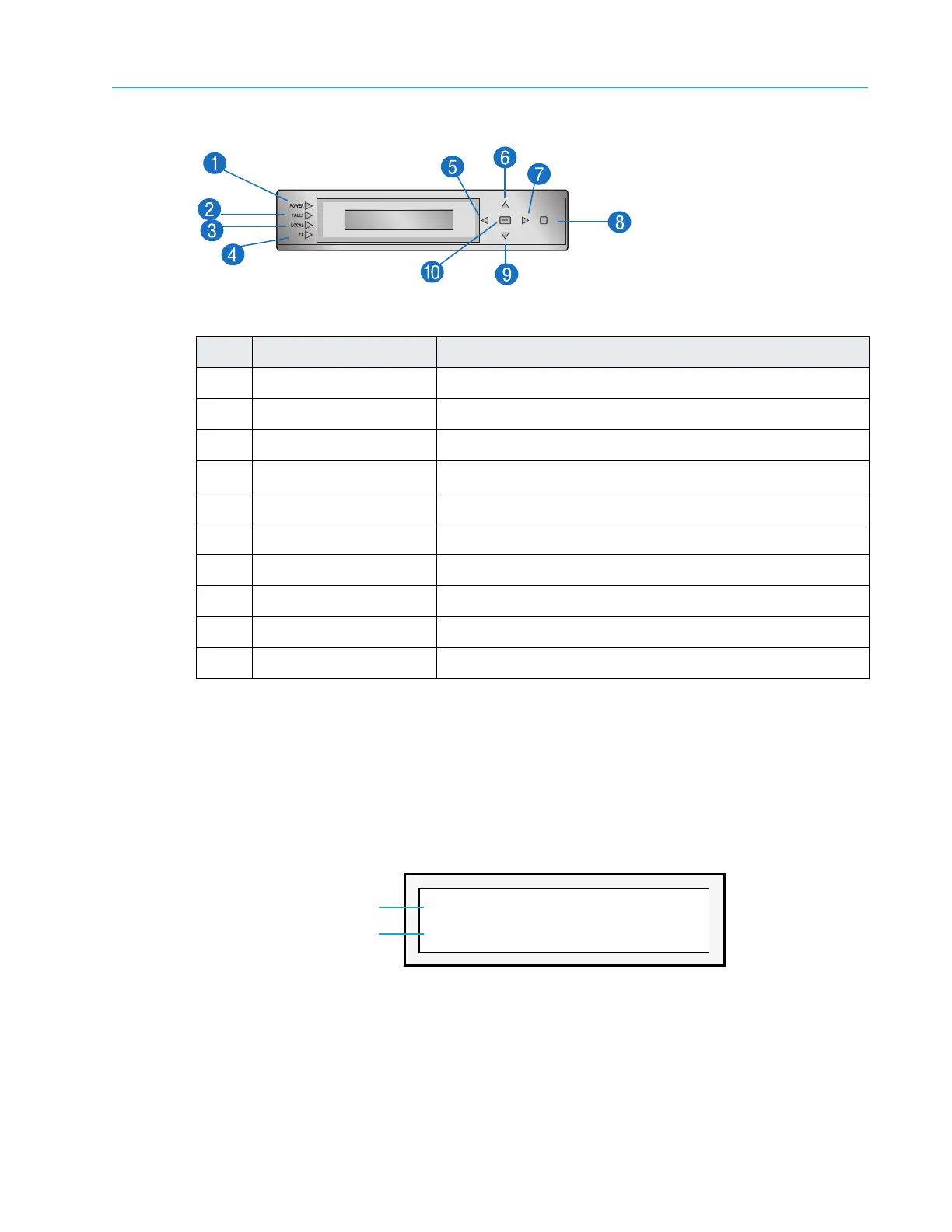
Figure 3–1: Front Panel Keypad
Item Feature Function
1 LED - Power Power indicator
2 LED - Fault Fault indicator
3 LED - Focal Local Control indicator
4 LED - TX Transmitting indicator
5 Left key Menu left
6 Up key Menu up
7 Right key Menu right
8 ESC key Menu escape
9 Down key Menu down
10 ENTER key Menu select
Front Panel Display
The four-line, 28-character Vacuum Fluorescent Display (VFD) shows the ProStream 9100 menus,
parameters, and options. As shown in Figure 3–2, line 1 of the local control panel shows the menu
path for the currently selected option. To represent a path, the VFD displays each submenu as
two or more letters and a colon.
Line 2 of shows the second line of a help message or a parameter value. To change this value,
you must enter the new value using the keypad.
Figure 3–2: Setting a Value in the Front Panel Display
A blinking cursor shows the current value. A s
teady cursor shows the value being edited.
Setting Network Properties of the Device
Before you can begin using SAG to configure the device, you must set the following parameters
of the device from the front panel.
NTWK: Control IP
Value to be edited
192.168.24.101
Parameter requires value setting



 To Next Page