63
5. You now return to the main menu. Either move on to another
setting by using the navigator button or
6. Press the menu (EXIT) button to exit the menu system.
Deleting several images from a selected medium
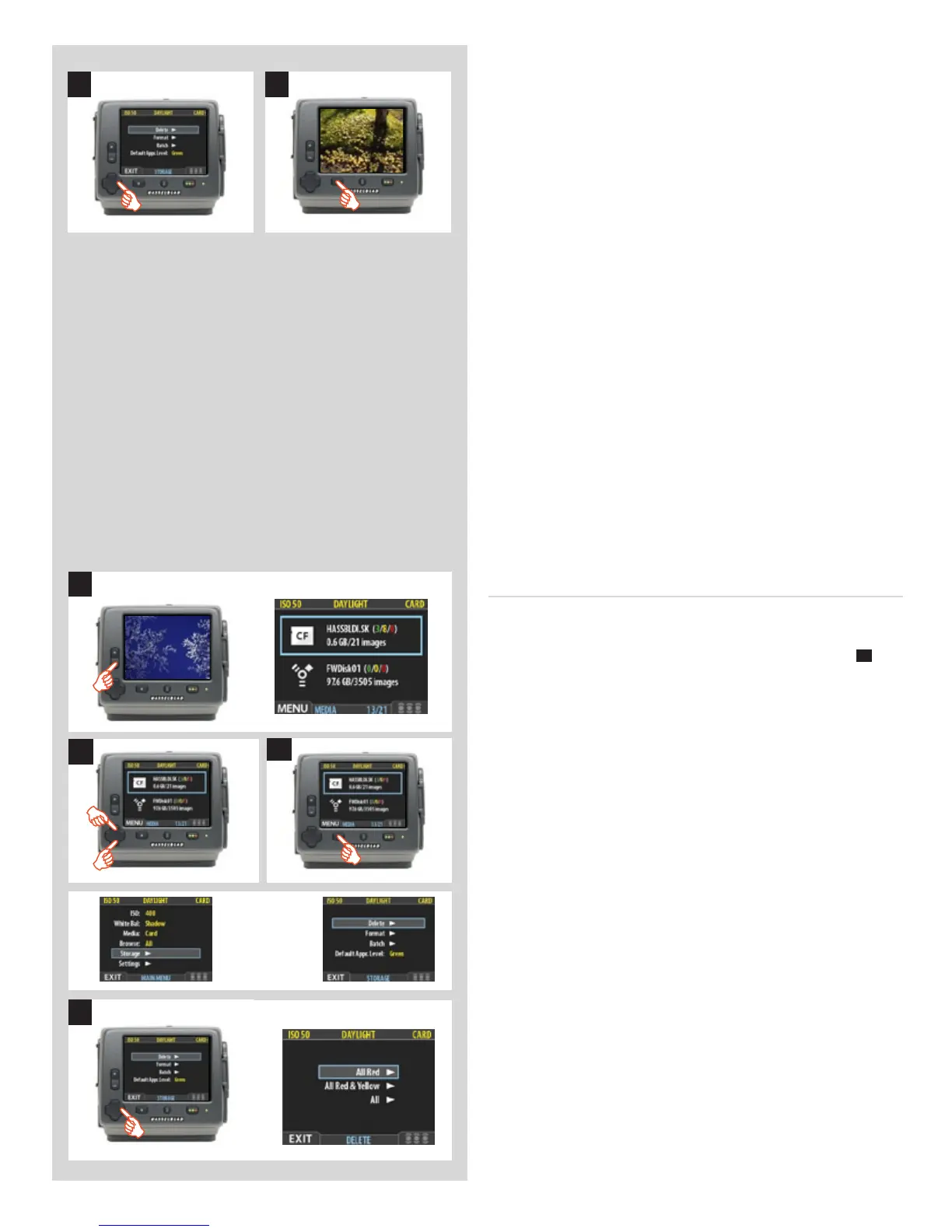
To delete several images at once:
1. Starting at the single-image preview display, press the
–
but-
ton until you reach the media list.
2. Use and to select the medium from which you wish to
delete. You will be deleting from all batches stored on that
item.
Note that both each listed medium shows a set of three coloured
numbers in parentheses to the right of the medium name.
These indicate the total number of images of each approval
status (green, yellow and red) that exist on the medium. For
example, if you see a medium that shows (18/5/3), then the
medium contains a total of 26 images: 18 green (approved), 5
yellow (unclassied) and 3 red (marked for probable delete).
3. Select MAIN MENU > STORAGE > Delete. (See also
Navigating the Menu System for details about how to nd
this setting.)
4. Press to open the Delete Image dialog.
5
6
3
2
4
1












 To Next Page