31
Inll tab
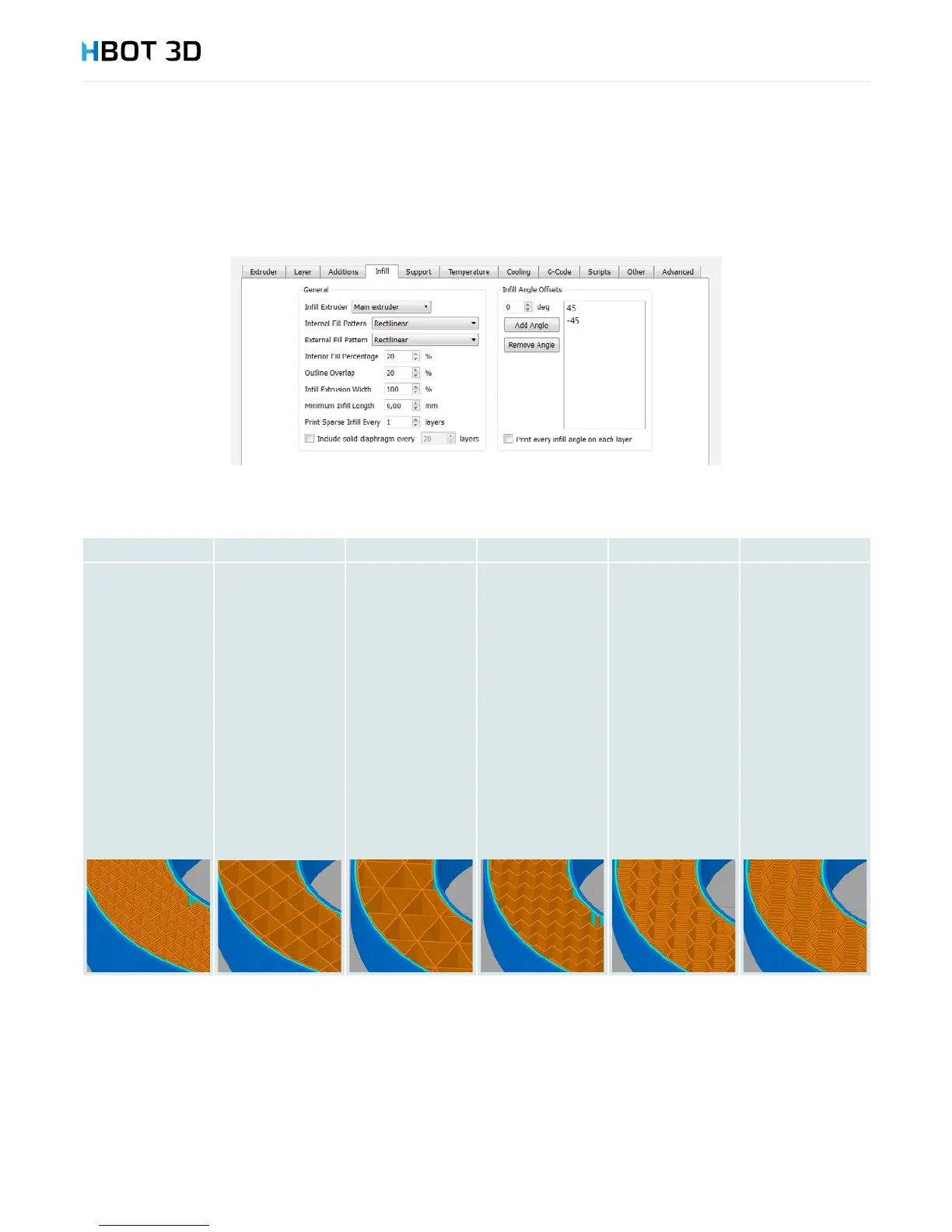
This sections enables you to modify interior ll parameters, mainly inll density and inll pattern (Interior Fill Percentage and Internal Fill
Pattern).
You have 6 different inll patterns to choose from:
Rectilinear Grid Triangular Wiggle Fast Honeycomb Full Honeycomb
Inll pattern
with the lowest
strength for low
inll percentage,
highest strength
for 80-100% inll
percentage. It is the
only inll pattern
that could be set to
100%. Inll paths do
not intersect within
the same layer.
Inll pattern with
a higher strength
for lower inll
percentages.
Maximum setting
which if congured
will not cause print
problems is 80%,
but the optimum
one is 20-40%. This
shape differs from
the Rectilinear
one in that the
paths intersect one
another within the
same layer, causing
better adhesion of
the entire inll.
The same inll
pattern as Grid, but
inll paths intersect
with one another
at 60-degrees. This
is the most stiff
and strongest inll
pattern for low inll
percentages. Like
in the case of the
Grid inll pattern,
maximum inll
percentage is 80%
and the optimum
one is 20-40%.
Polyline-shaped
inll pattern.
Simplied
honeycomb. A
structure with
similar properties
to the Triangular
one, also stiff but
less strong than the
full honeycomb.
Maximum inll
percentage is 80%,
and the optimum
one is 20-40%.
Full honeycomb.
Characteristic for
double inll path,
making the structure
very strong at low
inll percentages.
Support tab
Support Inll Percentage – inll density of support structures. The higher the inll density, the more accurately the support structures
are lled, but the print time and material consumption signicantly increase. Optimum value of this parameter is 20%.
Dense Support Layers – the number of support layers with the dense inll percentage where paths of your model are directly laid
down at. The more number of solid layers, the better support for curved and rounded surface. If support structures need to be quickly
removed, you may set the number of dense support layers to 0, but the quality of supported surface will be much worse.
Dense Inll Percentage – inll percentage of the dense support layers. The less density, the easier support removal but the lower
quality of the supported model surface.


 To Next Page