S321 User Guide Chapter 3
Setup and Configuration Page 32 of 65
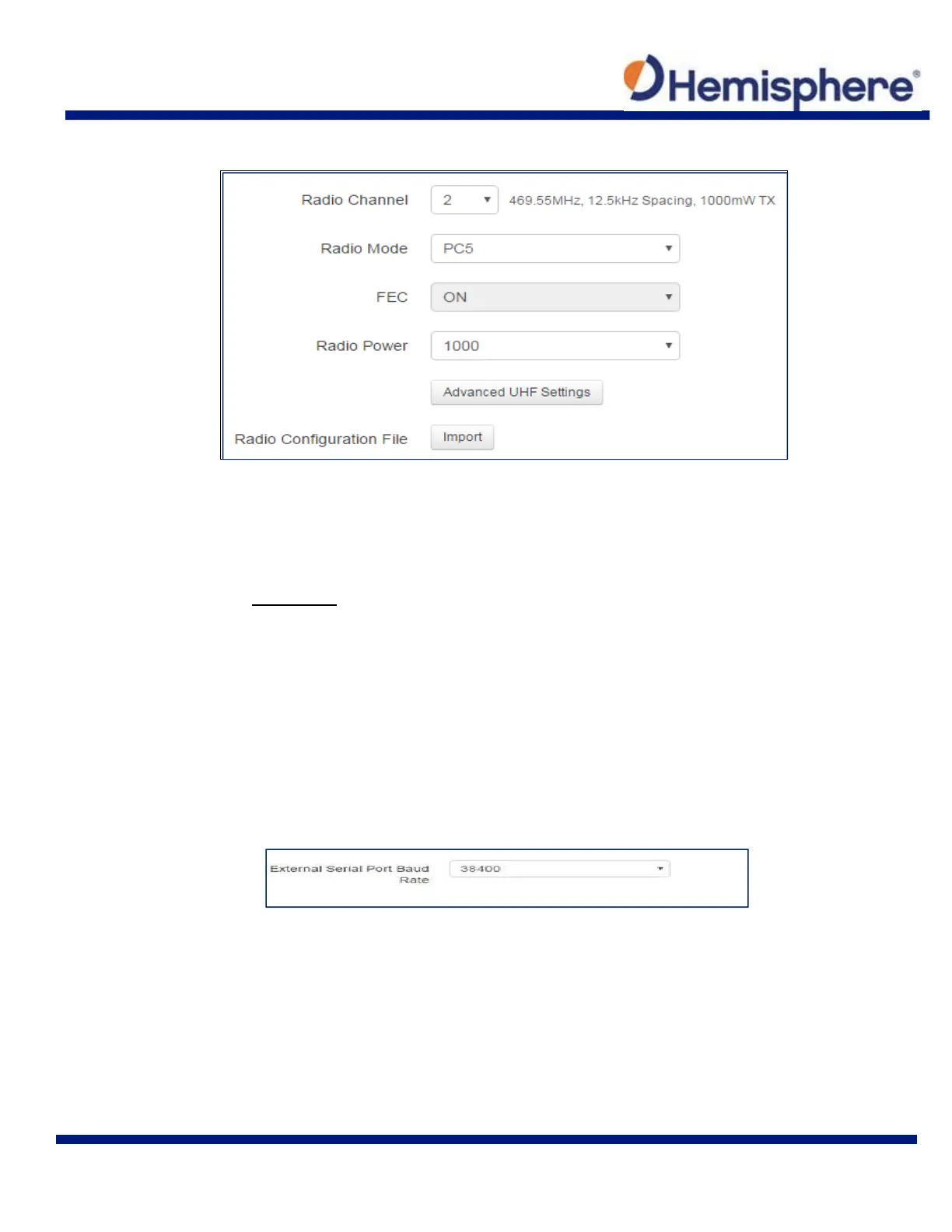
Next to Data Link select UHF. The following dialogue appears at the bottom of the page.
Radio Channel: Select a channel from the channel table provided by your dealer.
The frequency, bandwidth, and transmit power (base only) is shown next to the
channel
Radio Mode: The S321 supports PacCrest protocols (GMSK and 4‐FSK
modulation), Satel protocols, and Trimtalk protocols. For a full list of protocols, with
descriptions (FEC, Scrambling, over the air link rate, and modulation), please refer to
Appendix C.
FEC: Forward Error Corrections
Radio Power: Transmit RTK corrections at 100mW, 200mW, 500mW, or 1W
(dependent upon the radio settings and restrictions provided by your dealer). This
feature is only displayed when running as a base.
External
If you wish to send RTK corrections out of the serial port (such as to an external UHF radio)
instead of to the Internal UHF radio, as explained above, select External next to “Current
Datalink.”
Select the baud rate of the external device and plug that device into 5‐pin serial port. (Baud rates
range from 9600 bps – 115200 bps.)



 To Next Page