42
2
Description
2.5
Displays
2.5.1.
Main Screen
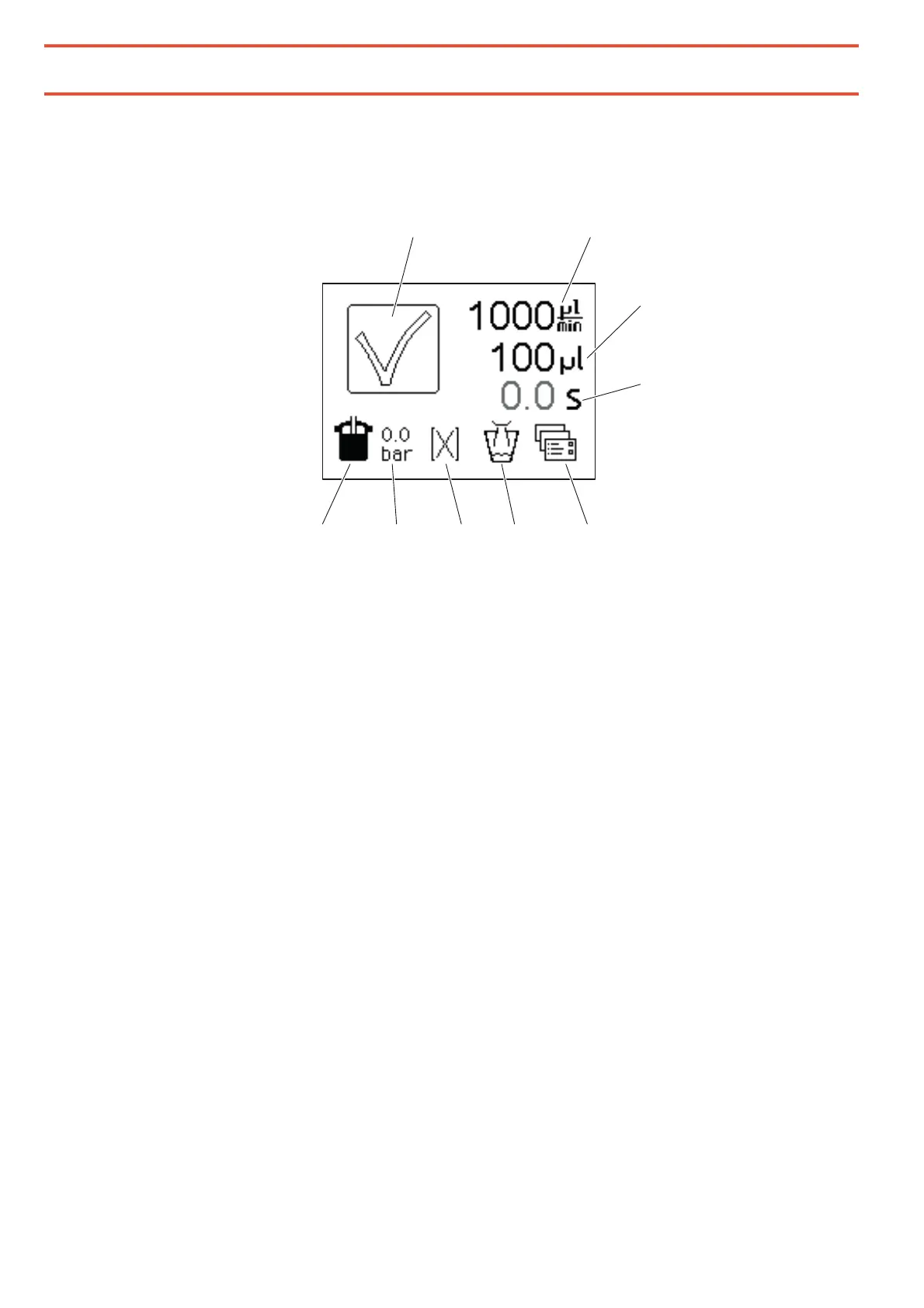
1
Status symbol for the dosage
2
Dispensing rate in microliters per minute
3
Dispensing quantity in microliters
4
Dispensing time in seconds
5
Key for the extended functions and settings menu
Set here:
– the rotor spray option and the rotor spray lag time,
– the operating mode
– the parameters for the suck-back feature
All parameters can be stored permanently
Access to a further submenu for the device settings
– the contrast of the display can be set
– the pump calibration can be performed and adjusted
– and the device can be returned to the factory settings
– the parameters can be protected by a password
6
Purge key
Touch the purge key to operate the pump manually with the parameters of the program
[X] for example to fill the pump and dosing nozzle or to purge the pump after it has been
idle for some time. Suck back is disabled in purge mode, irrespectively of the settings.


 To Next Page