55
5
Start-up
5.7
Enabling the syringe level counter option
This feature is intended to provide a minimum level control by counting down the dispensed
product amount from a given syringe content. It is intended for directly connected syringes
without hardware level sensors. It relies on precise syringe fill level and precise pump
calibration. Additional level crosschecking by the operator is recommended. Powering up the
unit will reset the counters and assume the use of a full syringe.
Requirements for the use of a product syringe:
– No product reservoir must be connected to the XS2 interface of the controller.
– The pump should be well calibrated, as shown in the last chapter.
● From the start screen – select the key for
the extended settings, and from the
extended settings the key for the device
settings.
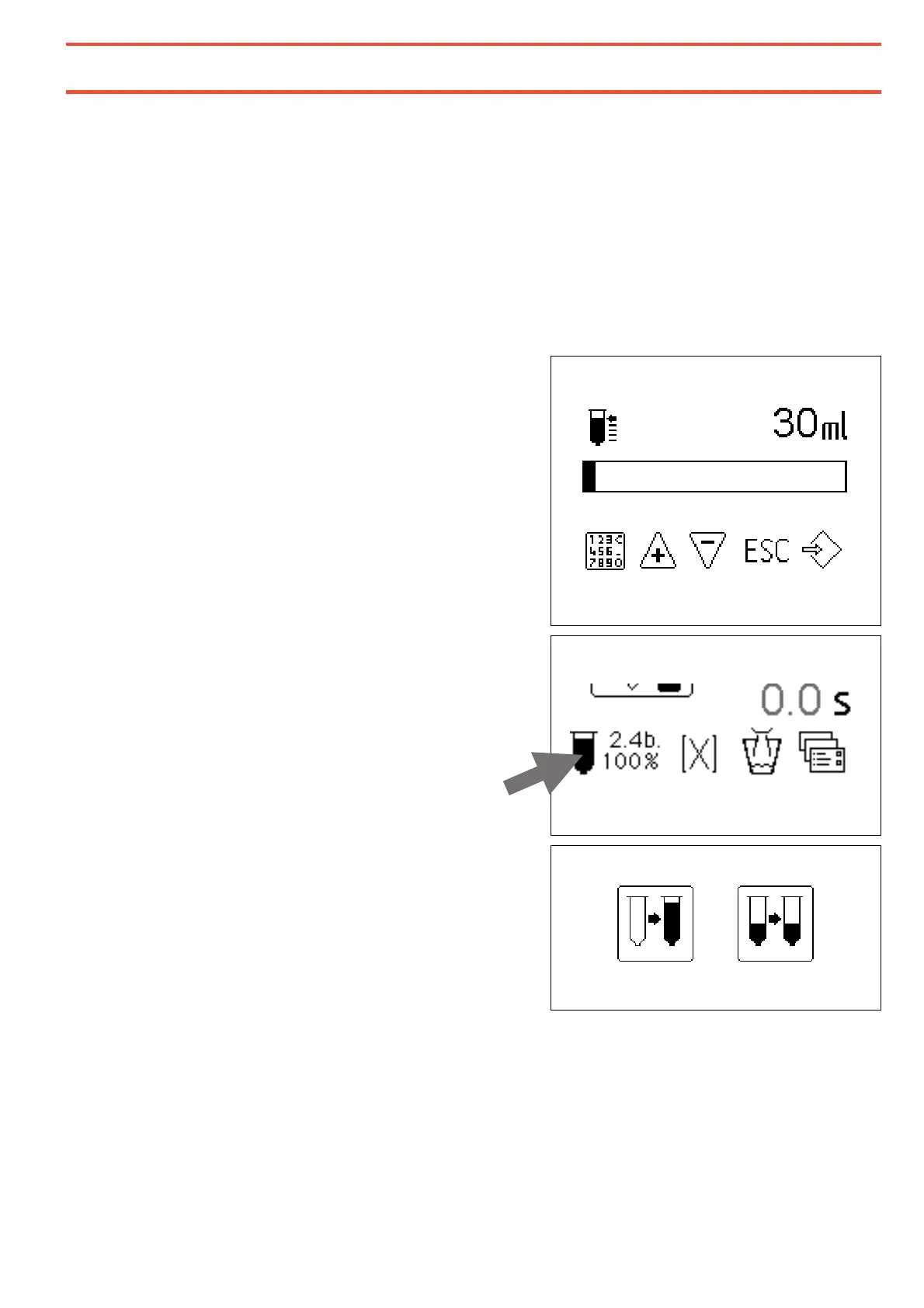
● Set the capacity of the used product
syringe and press the ENTER button 13.
By setting the capacity of the product in ml of
the inserted syringe the syringe level counter
feature is activated. The sign for the syringe is
displayed on the main screen. The actual level
is set to 100%.
In the main screen, by pressing on the syringe
symbol two symbolic options pop up:
By pressing the left button the volume
counter is reset to count down from a full
syringe.
The right button has the function of ESCAPE
so that the actual level can be preserved.


 To Next Page