23
Bluetooth:
Your vehicle is equipped with bluetooth
connectivity feature by which you can pair
your smartphone with the meter console of
your XTREME 200S PROGRAMMED FI
vehicle through Hero navigation application.
•
Turn the ignition switch “ON”.
•
Open hero navigation application on your
smartphone.
•
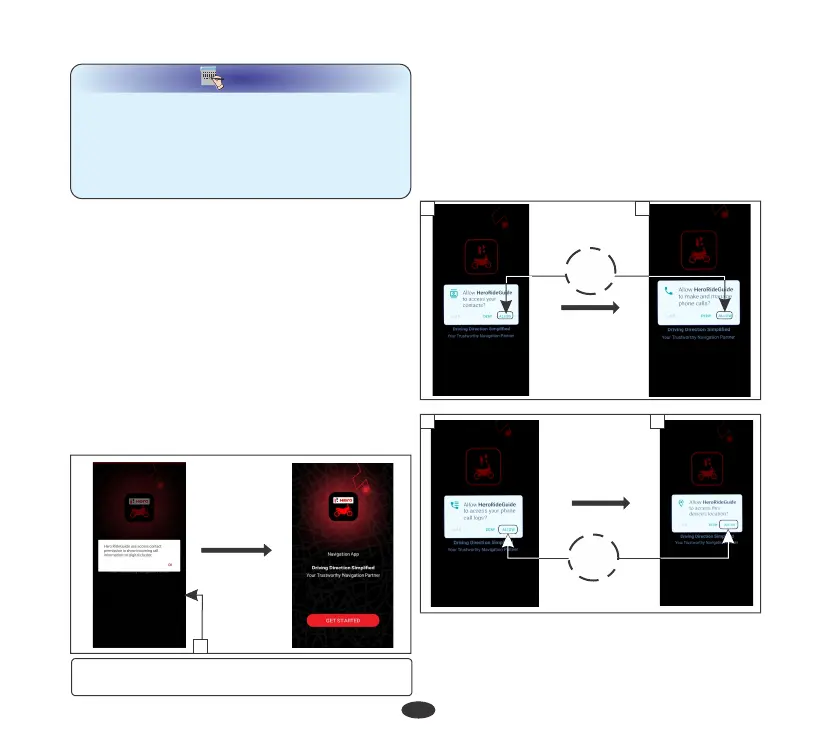
Give access to show incoming call
information on digital cluster (1), Then the
application will automatically start.
To connect your device proceed as follows:
b. Make & manage phone calls
•
For first time pairing, allow the application
to access:
a. Contacts
c. Phone call logs on your device
d. Device’s location if GPS is not enabled in
your device
(1) Access for incoming call information on
digital cluster
NOTE
NOTE
•
Compatibility and performance of hero ride
guide application may very based on your
device and software version.
•
Application needs GPS signal, internet and
bluetooth connectivity to perform the
desired navigation functionality.
•
Now select your bike (3).
•
Application also asks you to accept (2) the
terms of use to proceed.
c
d
ALLOW
a
b
1
ALLOW








 To Next Page