24
Pair
XXXXXX
PIN
•
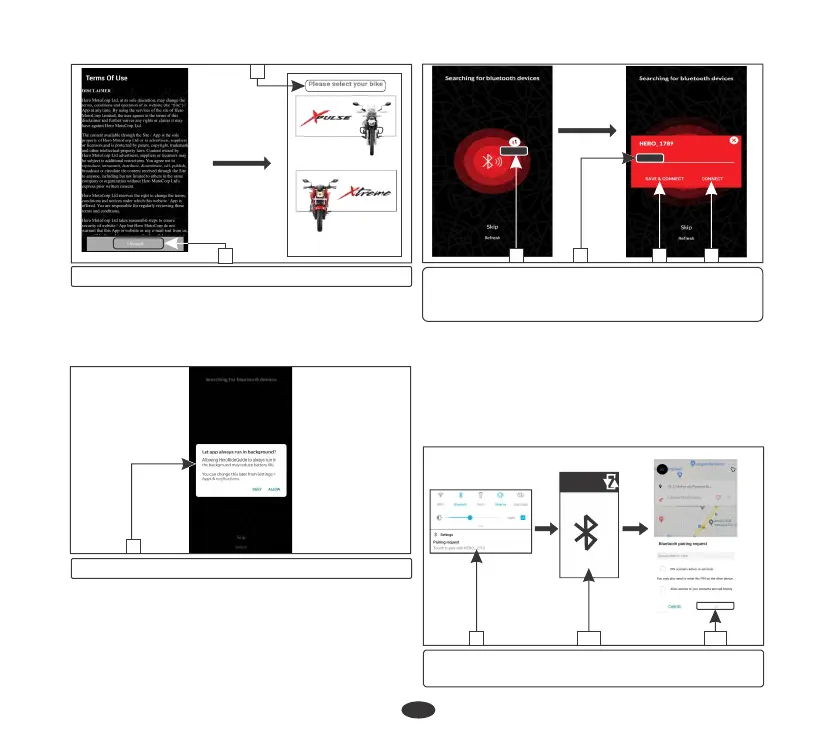
The application searches for a while and
displays all nearby devices. Select the device
with your name (5).
•
Update your name (6) (if required) and
select either save and connect (7) or
connect (8) to proceed.
(2) Accept terms of use (3) Select your bike
2
(5) Select your device
(6) Update your name
(7) Save and connect (8) Connect
5 6 7 8
•
Now application will send paring request
notification (9). Click on the notification
•
Now meter console will display paring pin
(10).
•
Enter the pin in navigation screen and select
“OK” (11).
(9) Pairing request notification
(10) Pin (11) “OK”
3
(4) Run in background
10
4
•
Now application asks the user to allow it to
run in background (4). It can be changed
later from Apps & notifications settings
when the application is not in use.
119






 To Next Page