13
7.4 Test Parameter
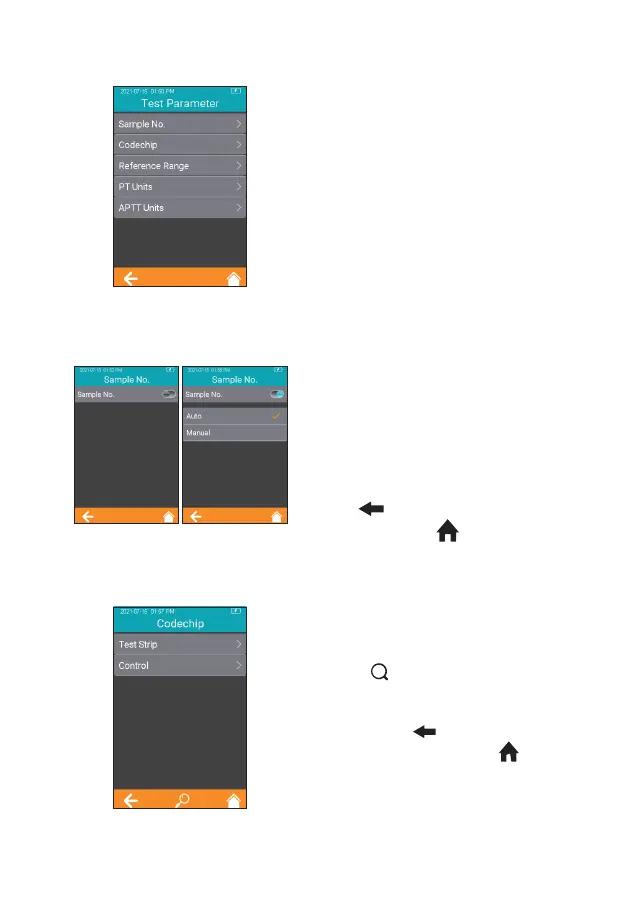
Click "Test Parameter" from the
Settings screen (Figure 2-1) to set
the parameters (Figure 2-6).
7.4.1 Sample No.
From the Test Parameter screen
(Figure 2-6), click Sample No. to set
the Sample number (Figure 2-7).
If the Sample No. button is grayed
out, then the sample does not need
to be numbered. If the Sample No.
button is teal, the sample can be
numbered manually or automatically.
Click " " to return to the previous
screen and click " " to return to
the main menu.
7.4.2 Codechip Strip
Click “Codechip” from Test
Parameter menu (Figure 2-6) to
enter Codechip menu (Figure 2-8).
Touch “ ” to search and view the
corresponding Codechip information
displayed based on the search
criteria. Click " " to return to the
previous screen and click " " to
return to the main menu.
2-6
2-7
2-8



 To Next Page