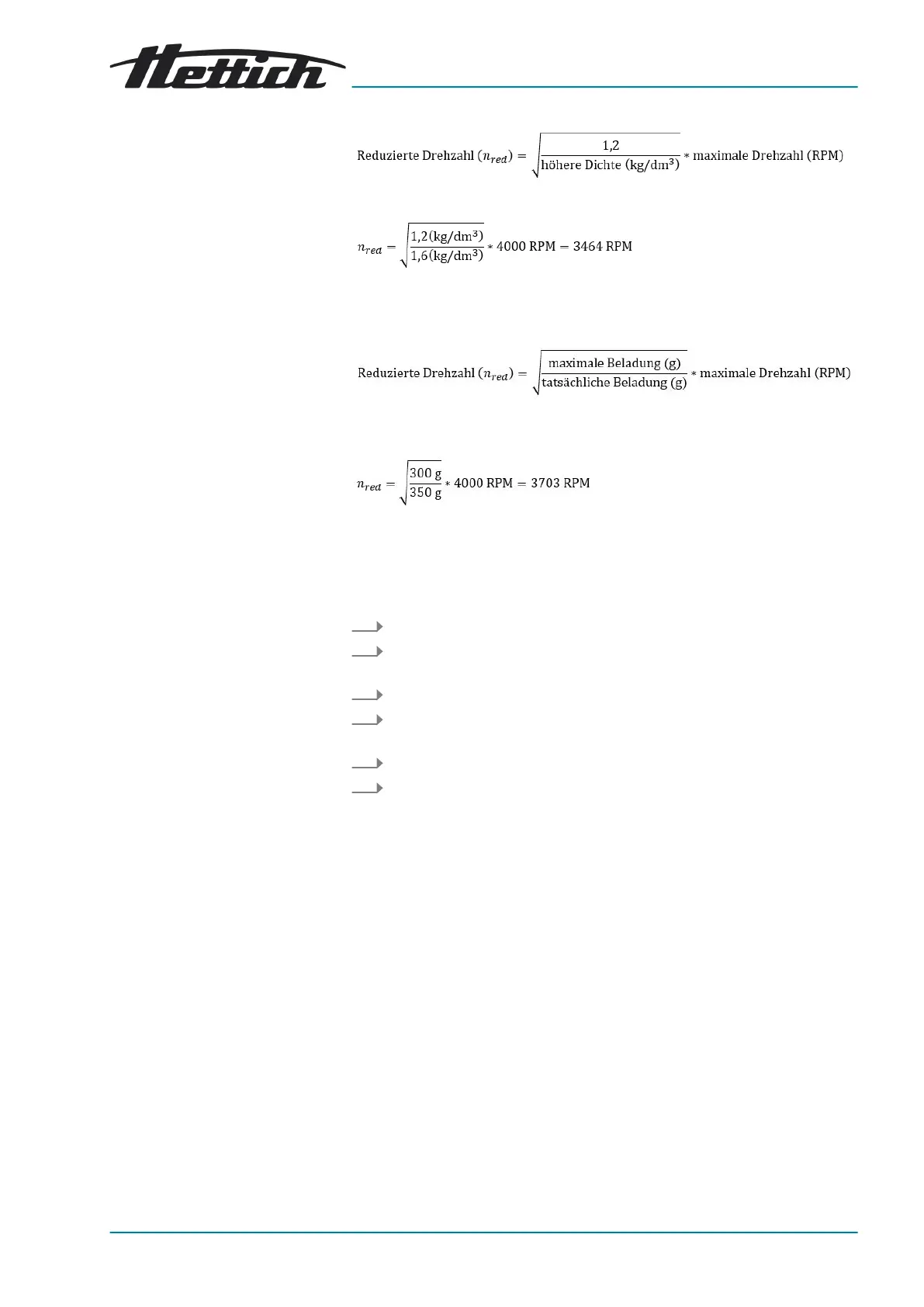
For example: Maximum speed 4000 RPM, density 1.6kg/dm³
If, in exceptional cases, the maximum load indicated on the bucket is
exceeded, the speed must also be reduced. The permissible speed can
be calculated using the following formula:
For example: Maximum speed 4000RPM, maximum load 300g, actual
load 350g
Please contact the manufacturer if you are not sure.
7.1.4
Centrifuging radius
The centrifuging radius must be entered in centimetres.
1. Switch off the mains switch.
2. Press and hold down the ▲
[RPM/RCF x 100]
button and the
[IMPULSE]
button simultaneously.
3. Switch on the mains switch and release the buttons.
4. Press the ▲
[RPM/RCF x 100]
button repeatedly until the centrifuging
radius and
‘rd’
are displayed.
5. Use the
[t]
buttons to set the desired centrifuging radius.
6. Press the
[STOP]
button to save the settings.
7.2
Rotor detection
■
Rotor detection is performed after starting a centrifugation run.
■ If the rotor has been changed, the centrifugation run is cancelled after
rotor detection. The rotor code (red) is displayed.
■ If the maximum speed of the rotor used is less than the set speed, the
speed is limited to the maximum rotor speed.
7.3 Machine Menu
7.3.1 Audible signal
7.3.1.1 General
The audible signal sounds:
■ after a problem occurs in the 2s interval.
■ after completion of the centrifugation run and rotor standstill in the 30 s
interval.
Opening the lid or pressing any button stops the audible signal.










 To Next Page