User manual for single-phase meter
32
Calendar clock
Time/date
Exception days
table
Item Date
Day table ID
Up to
50
exception days
Season table
Name Valid date
No exception day
Week table
Name 1 2 3 4 5 6
7
Day table ID
Exception day
Week name
Day table IDn(n=8)
Start_time Script tab Script ident
tou1
00000A0064
FF
1
... ... ...
Script table
Max Demand Tariff List
Tariff name Register index
“rate
1”
“
rate 2”
“rate 3”
“rate 4”
Energy Tariff List
Tariff name Register index
“rate 1”
“rate 2
”
“
rate
3”
“rate 4”
Up to 6 entries
Up to 8 entries
Energy Register List
Register
index
Description
01 Ac
tive Energy,
Import, Rate 1
… ...
Max Demand Register List
Register
index
Description
01
Max. Demand Register 2, (Active
Energy Import, Rate 1)
… ...
Current Tariff and Register
Script ident
1
...
parmeter
“rate x”
“
rate y”
...
...
Up to 8 script table
Day table ID3
Start_time Script tab Script ident
tou1
00000A0064
FF
1
... ... ...
Day table ID2
Start_time Script tab Script ident
tou1
00000A0064
FF
1
... ... ...
Day table ID1
Start_
time
Script ident
TOU1(HHMMSSHS) 1~8
TOU2(HHMMSSHS) ...
TOUn(n=8)(HHMMSSHS) ...
8
...
...
24 Active Energy, Net Total, Rate 4
20
Max. Demand Register 24 (Active
Energy Combined, Rate 4)
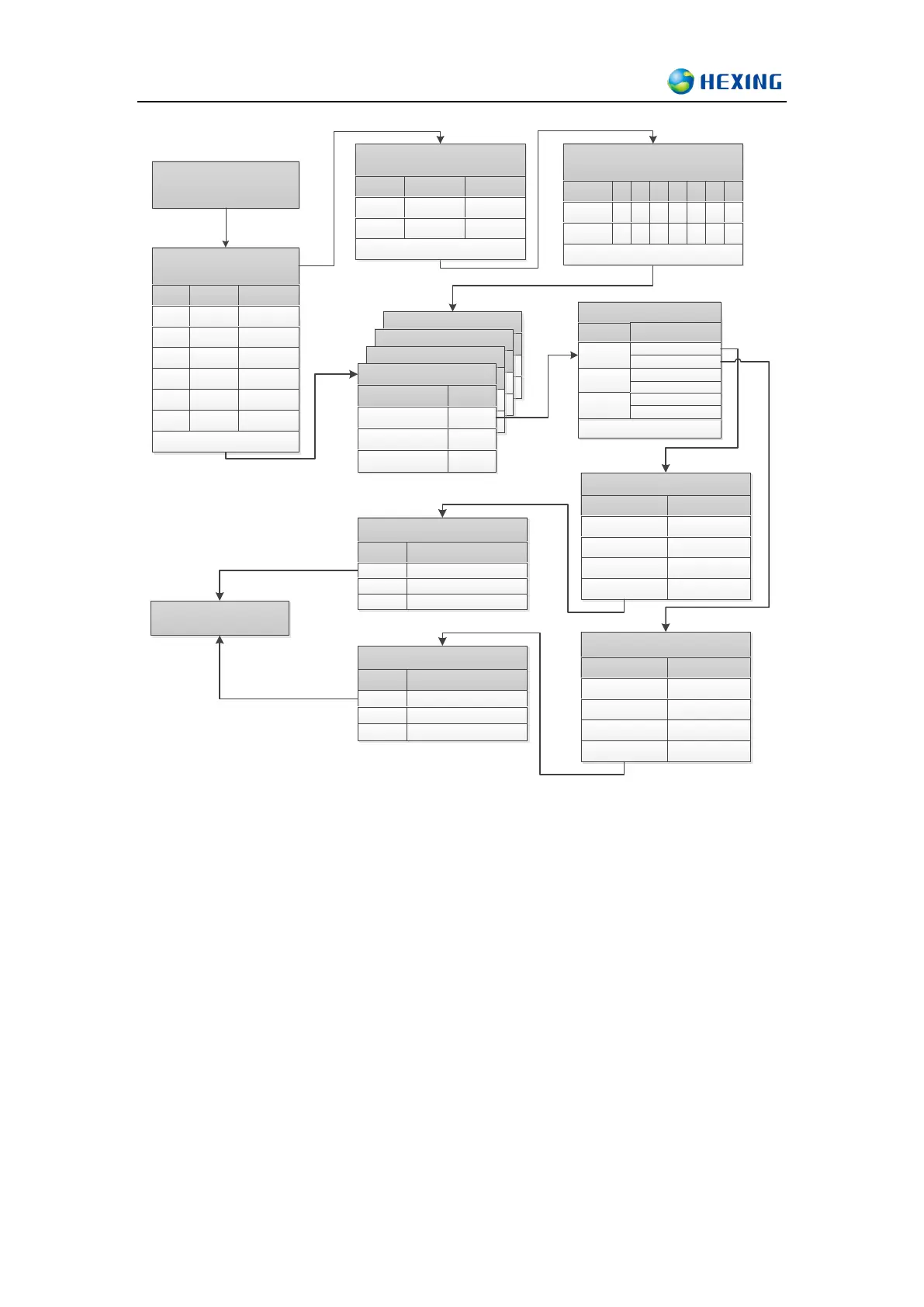
Flow chart of TOU tariff table judgment process
15.2.1 Active and passive tariff
Support active and passive tariff
The way to activate Passive tariff:
Set passive tariff active time and when meter clock goes across the set time, the passive
tariff will be activated and overwrite the old active tariff
Set clock into past time(earlier than meter now time), the passive tariff will activate
immediately.



 To Next Page