CHAPTER 6
Troubleshooting
Studio Command Series User Manual 69
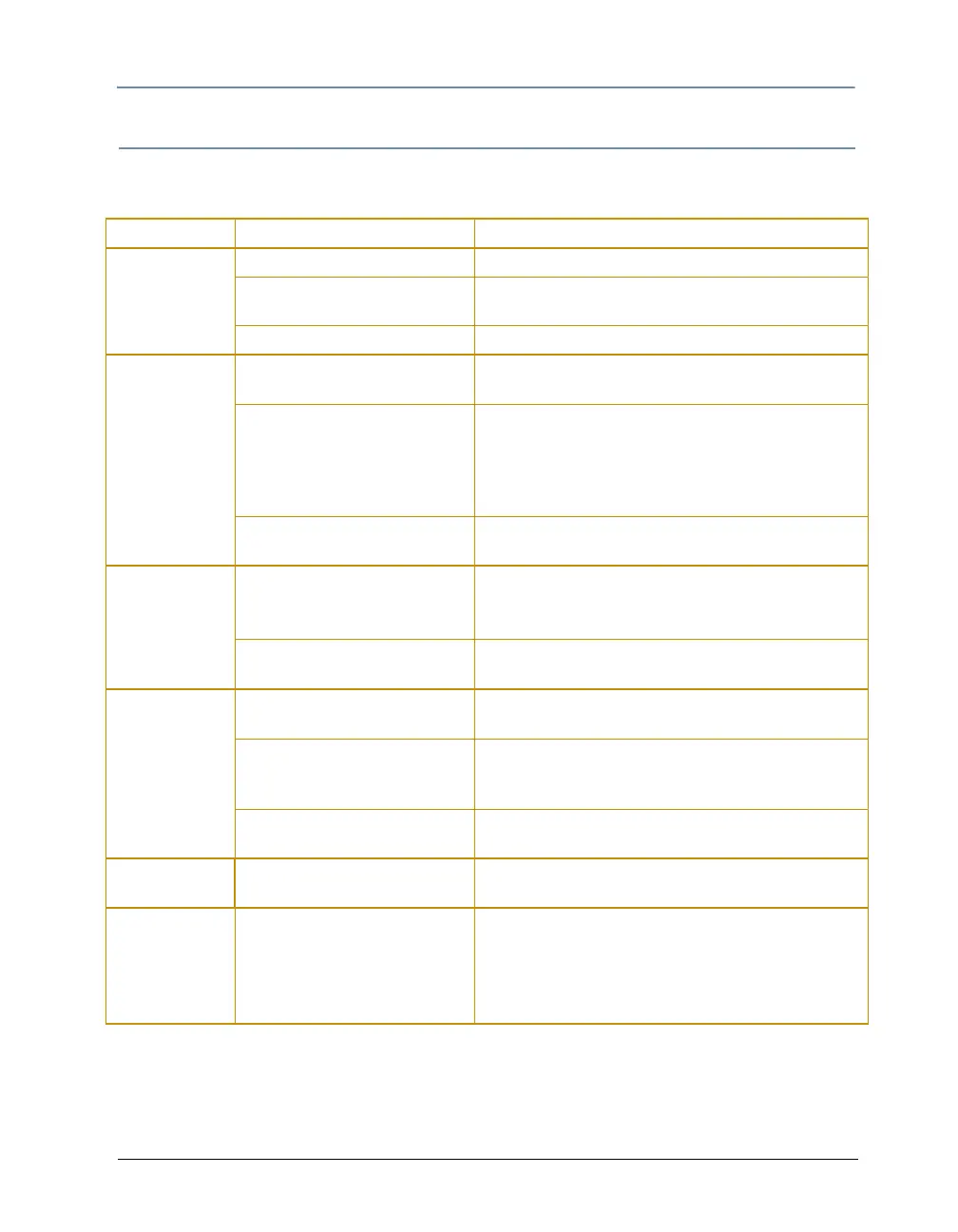
General Troubleshooting
Use the following table to find solutions to general fixture problems not indicated by
alphanumeric LED display error messages or status LEDs.
Problem Probable Cause Solution
Fixture will not
power on.
No power is connected. Connect power to the fixture.
Fuse is bad. Check the power supply fuses (see
Replacing Fuses
on page 55).
Power connectors are bad. Contact High End Systems customer support.
Fixture functions
but lamp does
not strike.
The lamp is bad. Replace the lamp (see
Replacing the Lamp on page
58).
The lamp is currently too hot to
strike. (700 model only)
Provide correct power source voltage, power cord
cap, and input voltage setting (see
Installing an
Attachment Plugs
on page 9). Allow the lamp to cool,
then restrike the lamp (see
Turning the Lamp On or
Off (LAMP)
on page 33).
The Ignitor connection is loose.
(700 model only)
Contact High End Systems customer support.
Lamp is dimmer
than other
fixtures.
• The lamp is bad or old.
• The wrong type of lamp is
installed.
Replace lamp with the specified type (see
Replacing
the Lamp
on page 58).
The lamp is not optimized. Optimize the lamp (see
Optimizing the Lamp on
page 59).
Lamp shuts off
during operation.
The lamp is bad. Replace the lamp (see
Replacing the Lamp on page
58).
The fixture has exceeded the
maximum temperature.
Allow the fixture 5 to 10 minutes to cool, then attempt
to strike the lamp (see
Turning the Lamp On or Off
(LAMP)
on page 33).
The lamp socket is loose and
causing arcing.
Contact High End Systems customer support.
Fixture not
homing properly.
A sensor, driver, or motor is
faulty.
Contact High End Systems customer support).
Color system is
not producing
the correct color.
The fixture is not properly
homed.
Home the fixture (see
Control Parameter on page 53
for controller Homing or
Homing the Fixture (HOME)
on page 33 to Home the fixture manually.)
Contact High End Systems customer support if
problem continues.



 To Next Page