User Manual of Digital Video Recorder
177
9.4 Network Detection
Purpose:
You can obtain network connecting status of device through the network detection function, including network
delay, packet loss, etc.
9.4.1 Testing Network Delay and Packet Loss
Steps:
1. Enter the Network Detection interface.
Menu > Maintenance > Net Detect
2. Click the Network Detection tab to enter the Network Detection menu.
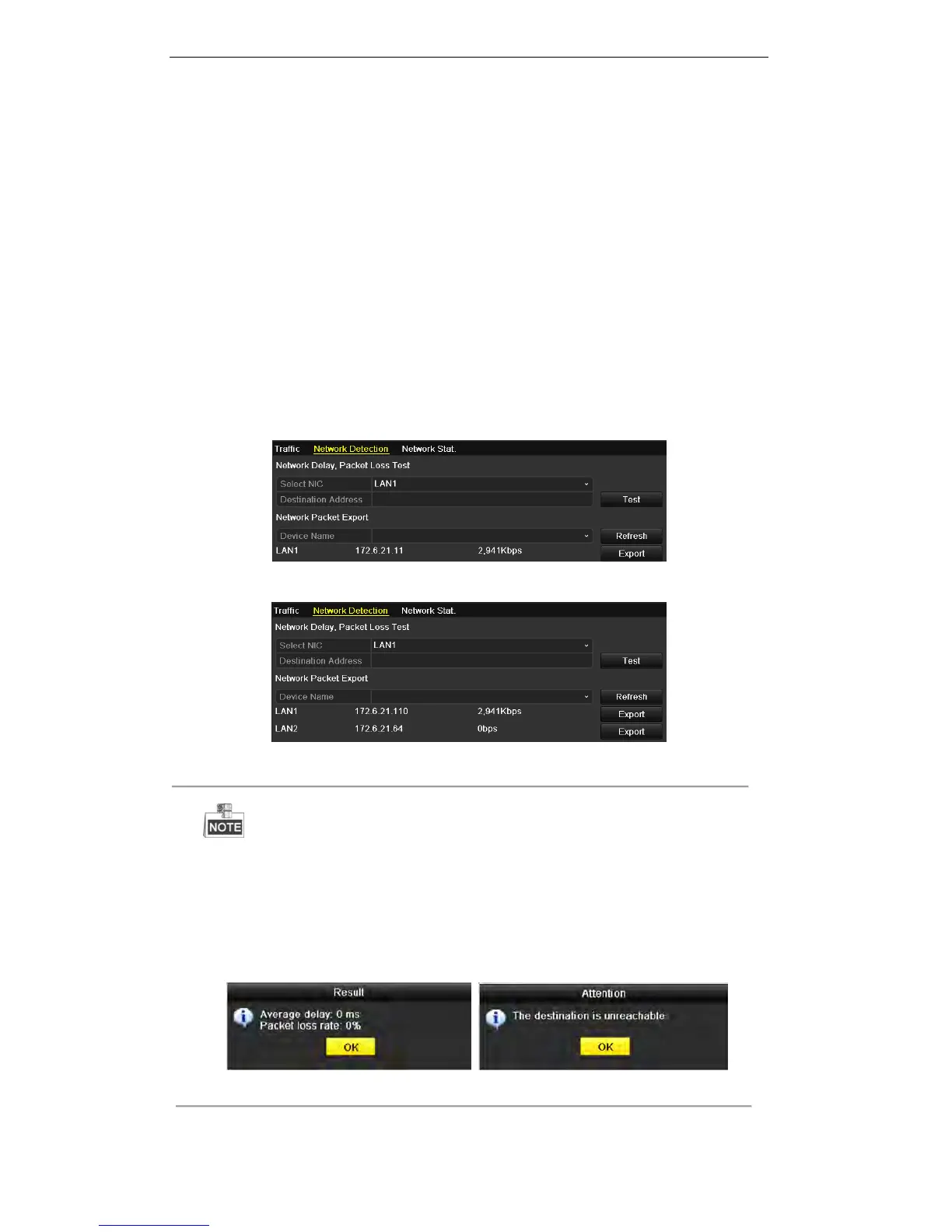
Figure 9. 48 Network Detection Interface for DS-7200HWI-SV Series
Figure 9. 49 Network Detection Interface for Other Series
Dual NIC is not supported by DS-7200HWI-SV series. We use the interface of DS-9100HFI-ST series
(unless otherwise stated) as example to describe the following settings.
3. Select a NIC to test network delay and packet loss.
4. Enter the destination address in the text field of Destination Address.
5. Click Test to start testing network delay and packet loss. The testing result pops up on the window. If the
testing is failed, the error message box will pop up as well.
Figure 9. 50 Testing Result of Network Delay and Packet Loss

 To Next Page
 Loading...