User Manual of Digital Video Recorder
192
10.4 Deleting Array / Virtual Disk
Before deleting the array, the virtual disk(s) under this array must be deleted first. Deleting array and virtual disk
will delete all the data saved in the disk.
10.4.1 Deleting the Virtual Disk
Steps:
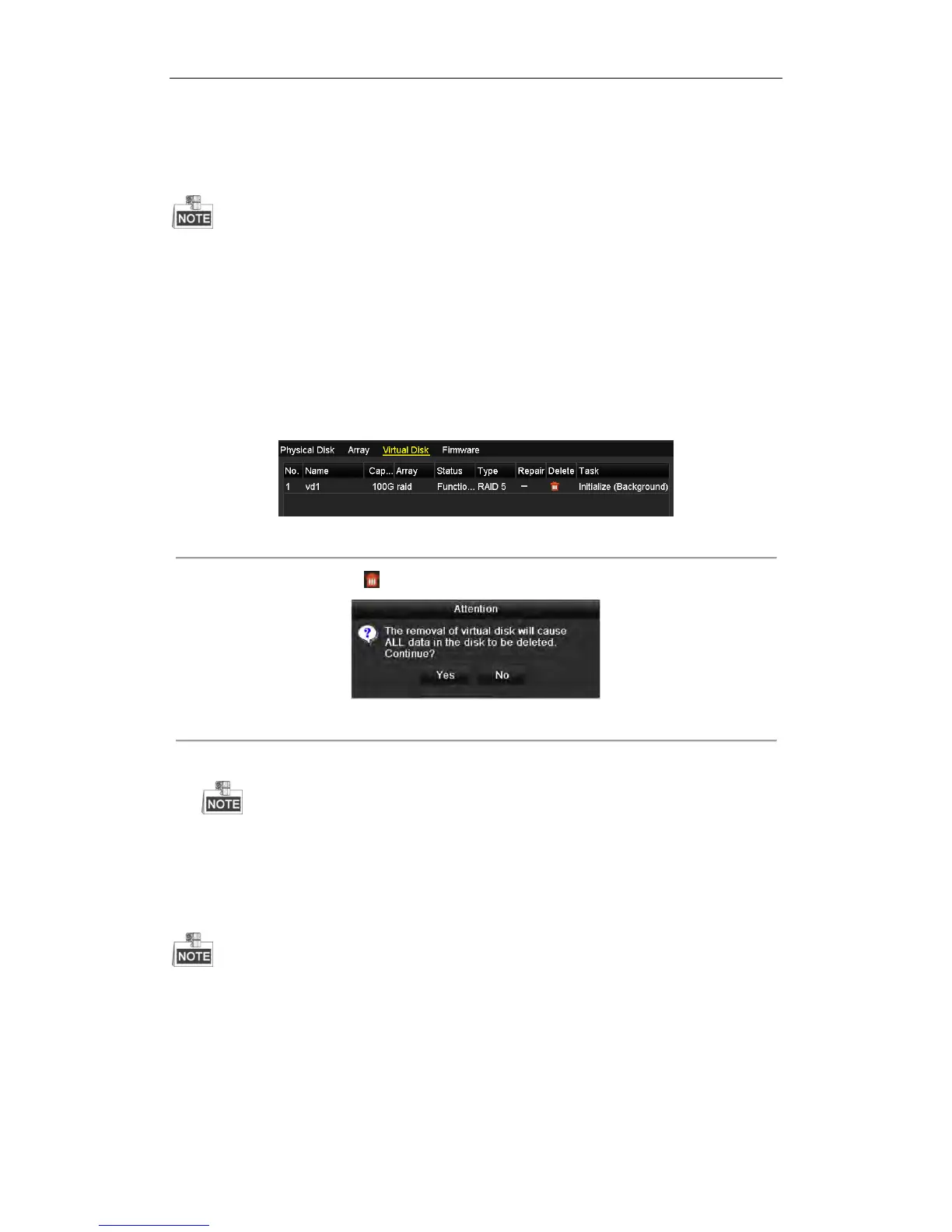
1. Enter the Virtual Disk interface.
Menu > HDD > RAID > Virtual Disk
Figure 10. 23 Virtual Disk Interface
2. Select a virtual disk and click to delete the virtual disk.
Figure 10. 24 Confirm Virtual Disk Deletion
3. In the pop-up message box, click Yes to confirm the virtual disk deletion.
Deleting virtual disk will cause to delete all the data saved in the disk.
10.4.2 Deleting the Array
If all the virtual disks under an array have been deleted, then you can delete that array.
Steps:
1. Enter the Array Settings interface.
Menu>HDD>RAID>Array


 To Next Page
 Loading...