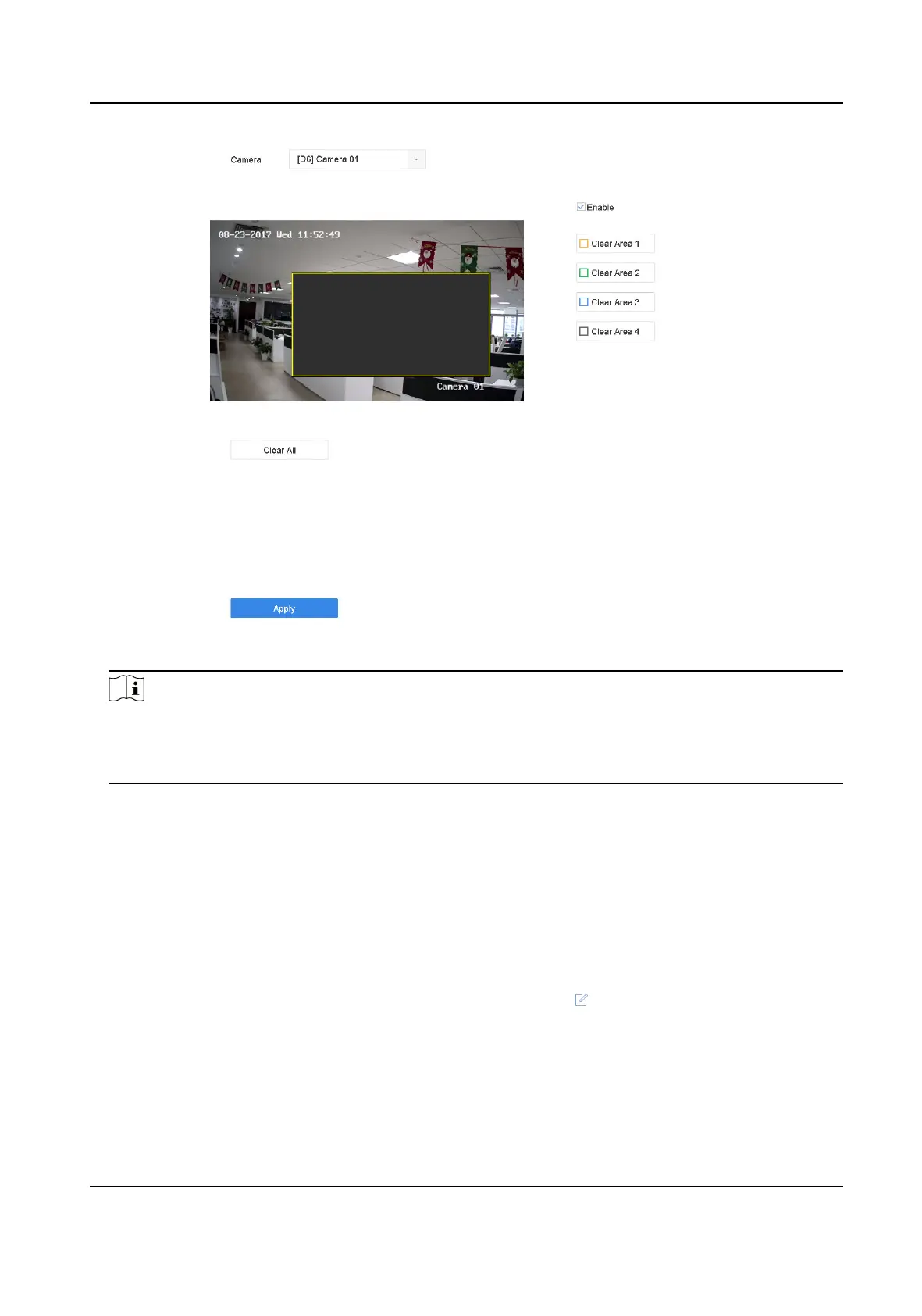
Figure 2-2 Privacy Mask Sengs
Note
●
Up to 4 privacy masks zones can be congured and the size of each area can be adjusted.
●
You can clear the congured privacy mask zones on the window by clicking the corresponding
clear zone 1 to 4 icons on the right of the window, or click Clear All to clear all zones.
5. Click Apply.
2.5 IP Camera Time Sync
The device can automacally synchronize the me of connected IP camera aer enabling this
funcon.
Steps
1. Go to Camera → Camera → IP Camera .
2.
Posion the cursor on the window of the IP camera and click .
3. Check Enable IP Camera Time Sync.
4. Click OK.
5.
Oponal: All IPC channels can be enabled/disabled with shortcuts.
1) Go to Maintenance → System Service → More
Sengs .
Network Video Recorder User Manual
19


 To Next Page
 Loading...