EQUIPMENT INSTALLATION
16
4.2.5 Register Headsets to Base Station
Before you permanently mount the base station on the wall, you must register the headsets to
the base station. The registered headsets should then be Walk Tested to determine the best location
to mount the base station. This helps provide the best reception and transmission to and from all the
areas of use.
After each headset has been registered to a base station, the base station will recognize the headsets
and differentiate between them and other electronic equipment operating on similar frequencies.
Up to 15 headsets can be registered to a base station. Replacement headsets must be registered
before they can be used. When a headset is replaced, the replaced headset remains in memory.
If the maximum number of 15 (in memory) is exceeded, you must clear some or all of the current
registrations to free up memory and register the new headset (see Clear Headset Registration, next
page).
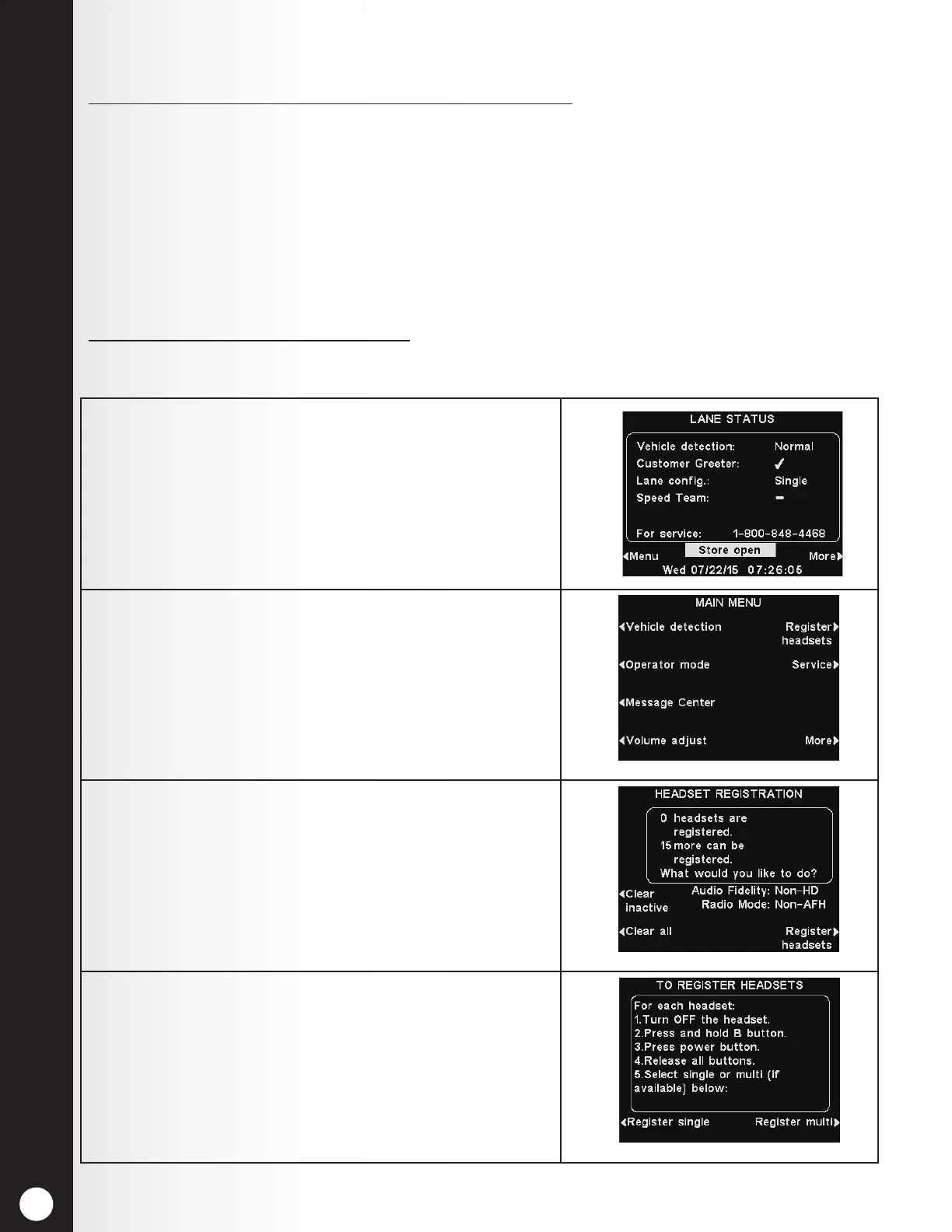
Register each headset as follows:
Note: Headsets must be within 6 feet (1.83 meters) of the base station while being registered.
1. Be certain all headsets or belt-pacs to be registered
are turned Off, and the base station power is On.
On the base station LANE STATUS display, press the
Menu button.
2. From the MAIN MENU, press the Register headsets
button.
3. From the HEADSET REGISTRATION display, press the
Register headsets button.
4. If you are registering only one headset or belt-
pac, press the Register single button. If you are
registering more than one headset, press the Register
multi button and continue registering each headset,
one at a time.



 To Next Page