BASE STATION SETTINGS
29
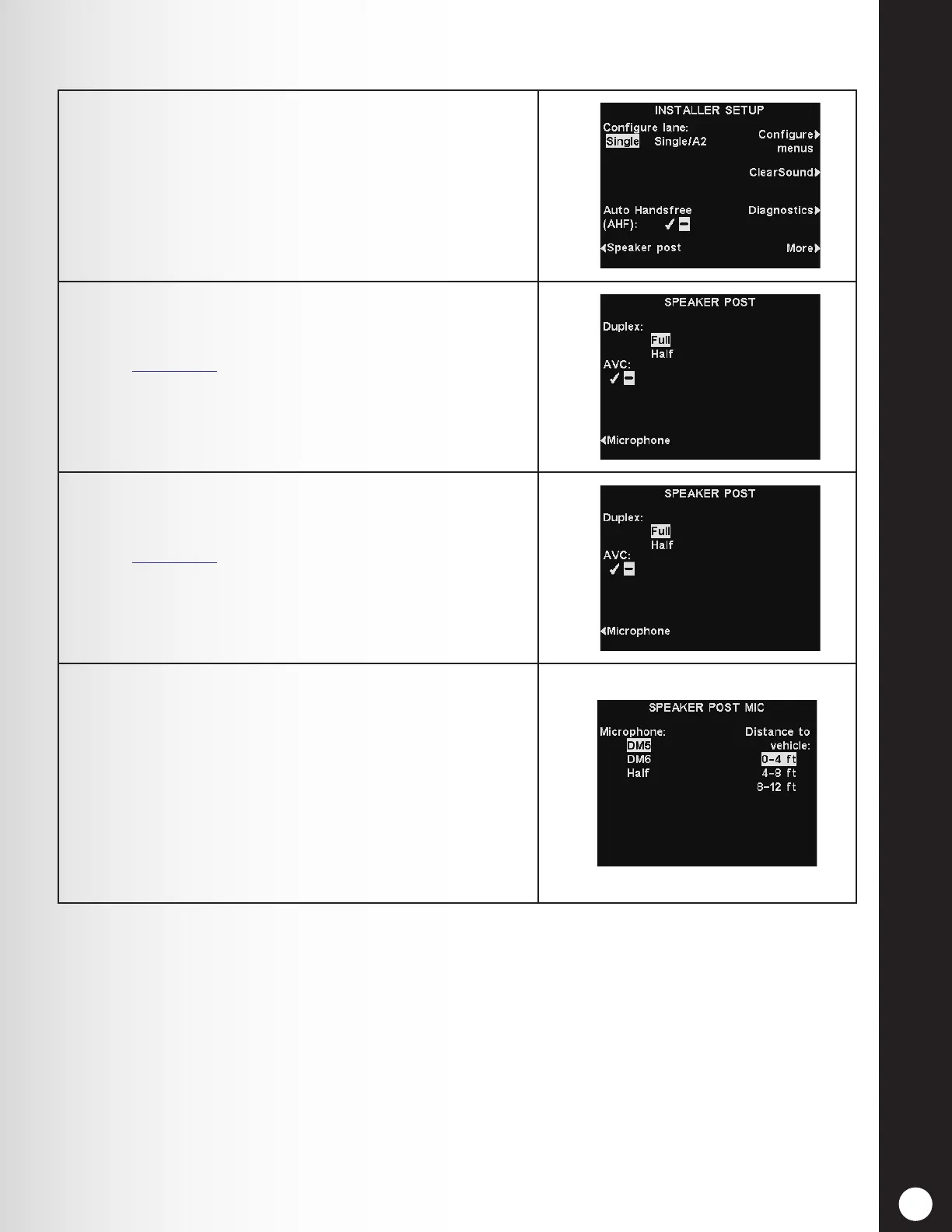
1. Select Speaker post on the INSTALLER SETUP
display to access the SPEAKER POST display and
make the necessary outside speaker/microphone
settings.
2. Press the Duplex button to select Full or Half duplex
operation.
See Section 1.1, pg. 1, for information regarding
duplex operation.
3. Press the AVC button to select the ✔ (on) or − (off)
option for AVC (Automatic Volume Control).
See Section 6.3, pg. 86, for more details on AVC.
4. Select the type of microphone installed in the speaker
post by pressing the Microphone button repeatedly
until that microphone is highlighted. The default is
DM5.
Select the typical distance from the microphone to
the vehicle in the drive-thru lane by pressing the
Distance to vehicle button repeatedly until the
correct distance is highlighted.
Press the Back button to save the setting.
5.2.3 Speaker Post



 To Next Page